After changing to Debian 6 i had to recompile the Cisco IPSec kernel module (cisco_ipsec.ko). But i ended up with:
But the network-manager has one tab labelled vpn... What about using this one?

The first try was not successful, because the "add"-button was disabled. After some googling around there was a hint to install the following package:
The button was enabled but only Point-to-Point-Tunneling-Protocol could be chosen. A lookup on http://packages.debian.org showed the following packages in addition:
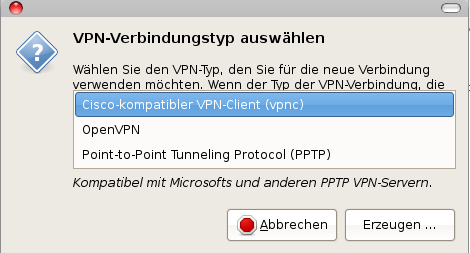
And with choosing vpnc the following dialog was shown

and after filling in all parameters, the vpn connection was established without any problem...
hades:/packages/vpnclient# ./vpn_installOk... this does not work anymore.
Cisco Systems VPN Client Version 4.8.02 (0030) Linux Installer
Copyright (C) 1998-2006 Cisco Systems, Inc. All Rights Reserved.
....
Making module
make -C /lib/modules/2.6.37.3/build SUBDIRS=/packages/vpnclient modules
make[1]: Entering directory `/usr/src/linux-2.6.37.3'
CC [M] /packages/vpnclient/linuxcniapi.o
/packages/vpnclient/linuxcniapi.c:14:28: error: linux/autoconf.h: Datei oder Verzeichnis nicht gefunden
make[2]: *** [/packages/vpnclient/linuxcniapi.o] Fehler 1
make[1]: *** [_module_/packages/vpnclient] Fehler 2
make[1]: Leaving directory `/usr/src/linux-2.6.37.3'
make: *** [default] Fehler 2
Failed to make module "cisco_ipsec.ko".
But the network-manager has one tab labelled vpn... What about using this one?
apt-get install network-manager-pptp-gnome
apt-get install network-manager-openvpn-gnomeAfter installing these packages the following vpn-types were selectable:
apt-get install network-manager-vpnc-gnome


