Showing posts with label Web. Show all posts

Jan 6, 2024

1 million visitors reached!

After 17 years (!) this blog reached 1.000.000 visitors.


Some more numbers: 591 articles written, 2.200 comments which where spam, 360 published comments, nearly 200 posts about Linux, 180 posts about Oracle, nearly 50 reviews on books...


Let's see if the 2mio will be reached in 2040 (omg).


Jul 30, 2023

Postman: Scratchpad is end of life - Only cloud based workspaces possible --> How to keep the passwords/secrets secure?

Postman is the swiss army knife tool for dealing with HTTP(S) requests. You want to test anything with an GET, PUT, POST, OPTION call? Postman is the way to go.


But some months ago postman announced the following:

Scratchpad was the option to work locally on your PC with postman and nothing was synced to the cloud. That was really cool, because most of the HTTPS requests have to be authenticated in some way (basic auth, secrets for oauth, api-keys, etc...)
From my perspective cloud is a very cool thing, but moving all the sensitive parameters into the postman cloud is not really an option.
So what to do? 
  1. Check alternatives....
    But there is nothing like postman. e.g. the possibility to render the request to a curl, powershell, NodeJS axios, ... call and use this anywhere else....
  2. Remove all sensitive data from your request
    A good step (and just to note: it is bad design, if you ever stored secrets inside the calls :) )
  3. Now the calls do not work anymore....
    :(
But this problem was addressed really a long time ago (more than 4 years ago):


So here the link to the solution:

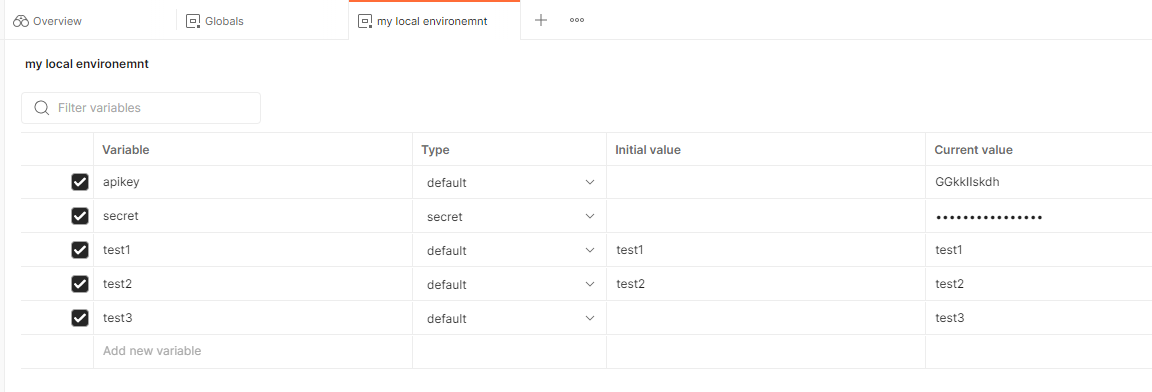
It is just this easy:use variables and do not fill the initial value!

Here the tests: 
First the local postman:

Second the browser postman:


As you can see: the current values are empty inside the cloud for all entries, which have the inital value not filled...
(By the way: the current value is always a copy of the inital value. If you put there something like test11 and test22, only test1 and test2 will show up in the cloud version).

May 19, 2021

Microsoft Teams: How to prevent Teams echo bot from constantly disturbing phone conferences

Some people have found a new hobby: Blowing up Teams meetings.

How do they achieve this?

Very easy. If you are inside a Teams meeting just go to "add members" and type in "Teams echo":

The annoying things about this: 

  • This can be done by anyone who was invited and is not limited to your organzation
  • On Linux you are not able to invite the Team Echo
  • The lobby does not work for Teams Echo - that means he will join you and you have to chance to get rid of that.
  • You can not mute Teams Echo

Then click on this and you will get the following experience:


There is one hint i found:

https://docs.microsoft.com/en-us/answers/questions/284720/can-we-block-or-remove-39teams-echo39-bot-from-ent.html 

Microsoft itself does not really understand the issue:

https://answers.microsoft.com/en-us/msteams/forum/all/teams-echo-entering-into-meetings/3418d131-8619-4785-9ab4-0aed6acbb8c2?auth=1

But this does not work, because you do not find a "Teams echo app" inside https://admin.teams.microsoft.com/policies/manage-apps 

The problem is known:


If you know how to prevent this: Please leave a comment...

Jan 31, 2021

Office 365: Enable mail forwarding to external email domains...

For a society i do some IT administration things - and now something really new: a Office 365 tenant.

First thing was to enable mail forwarding to external email accounts. Sounds easy - hmmm not really.

Configuring the forwarding in outlook.com is quite easy:

But this does not work:

Remote Server returned '550 5.7.520 Access denied, Your organization does not allow external forwarding. Please contact your administrator for further assistance. AS(7555)'

To change this behaviour you have to go to the admin settings:

https://protection.office.com/antispam

Now click policy:

Then choose Anti-spam:

And the chose the third entry and click "edit policy":
And the last step: Change Automatic forwarding to "on"
After you click save the email will now forwarded to external domains...


Aug 7, 2020

openssl: strange error.... (at first glance) error:2008F002:BIO

Some days ago i wanted to do a check of a certificate of an ip address. No big deal - so i did:
schroff@zerberus:~$ openssl s_client -showcerts  -connect 82.165.229.87.87:443

140011908769088:error:2008F002:BIO routines:BIO_lookup_ex:system
lib:../crypto/bio/b_addr.c:726:Name or service not known
connect:errno=22
So i opened google to find a solution.
But on google i found nothing really helpful.

?

The answer was very easy:
If i read the command line carfully, i would have detected my error:

THE IP ADDRESS WAS INVALID

I wrote an ipv4 with 5 numbers and not with 4...

After using a correct ipv4 number the command worked like expected:
schroff@zerberus:~$ openssl s_client -showcerts -connect 82.165.229.87:443 #
CONNECTED(00000003)
Can't use SSL_get_servername
depth=2 C = US, O = DigiCert Inc, OU = www.digicert.com, CN = DigiCert Global Root CA
verify return:1
depth=1 C = US, O = DigiCert Inc, OU = www.digicert.com, CN = GeoTrust RSA CA 2018
verify return:1
depth=0 C = DE, ST = Rheinland-Pfalz, L = Montabaur, O = 1&1 Mail & Media GmbH, CN = gmx.net
verify return:1
---

Mar 15, 2020

Streaming a video file with vlc to other devices (like smartphones, etc.)

If you want to look a video on a tablet or smartphone (or laptop) and the file is on a server in your network, you can do this very easily with vlc.
One big advantage: The video can be consumed by many devices - so the movie can be watched on e.g. 3 tablets...

What do you have to do?
Install vlc on your computer (i used a ubuntu laptop) and start vlc.
Next step is to open the menu: media -> stream... (or press Strg-S):

Then select the video on your disc with "+Add":
 After that click on "Stream" and this window will open:
 Click "Next" and then choose "HTTP" and press "Add"
 On the next window you have to enter the port and URL, where the devices have to connect to (in my example, the ip of my laptop was 192.168.178.39 - so the URL is 192.168.178.39:8080/test)
 Then you should select this setting and click on the wrench (="settings"):
 Here you have to select "Keep original audio track", otherwise audio will not work:

Last window before the streaming starts:
Copy the string to your clipboard
:sout=#transcode{vcodec=h264,scale=Auto,scodec=none}:http{mux=ffmpeg{mux=flv},dst=:8080/test} :no-sout-all :sout-keep
 After that install vlc on your device, start it and enter the URL:
 Press "Verstanden und weiter" ;-)
 and here we go:

If you want to skip the wizard, just open vlc with the string from your clipboard
(you have to escape the curled brackets!):

vlc test.mp4 :sout=#transcode\{vcodec=h264,scale=Auto,scodec=none\}:http\{mux=ffmpeg\{mux=flv\},dst=:8080/test\} :no-sout-all :sout-keep

Mar 14, 2020

Squid: How to setup a proxy...


If you are limited on bandwidth and you want to setup several machines, using a caching proxy will speed up your installation process significantly.


What is a caching proxy:
https://en.wikipedia.org/wiki/Proxy_server#Improving_performance

But proxies have some issues, that you should be aware of:
https://en.wikipedia.org/wiki/Proxy_server#Content-control_software

If you are sure, to use a proxy, just enter these commands:

root@zerberus:~# apt install squid
Reading package lists... Done
Building dependency tree       
Reading state information... Done
The following additional packages will be installed:
  libdbi-perl libecap3 squid-common squid-langpack
Suggested packages:
  libmldbm-perl libnet-daemon-perl libsql-statement-perl squidclient squid-cgi
  squid-purge resolvconf smbclient winbindd
[....]

Unpacking squid (3.5.27-1ubuntu1.5) ...
Setting up libecap3:amd64 (1.0.1-3.2) ...
Setting up squid-langpack (20170901-1) ...
Setting up squid-common (3.5.27-1ubuntu1.5) ...
Setting up libdbi-perl (1.640-1) ...
Setting up squid (3.5.27-1ubuntu1.5) ...
[....]
To check the default configuration you can use this command:
(to suppress the documentation and comments)

root@zerberus:/etc/squid# cat squid.conf |grep -v \# |grep -v -e "^$"

acl SSL_ports port 443
acl CONNECT method CONNECT
http_access deny !Safe_ports
http_access deny CONNECT !SSL_ports
http_access allow localhost manager
http_access deny manager
http_access allow localhost
http_access deny all
http_port 3128
coredump_dir /var/spool/squid
refresh_pattern ^ftp:        1440    20%    10080
refresh_pattern ^gopher:    1440    0%    1440
refresh_pattern -i (/cgi-bin/|\?) 0    0%    0
refresh_pattern (Release|Packages(.gz)*)$      0       20%     2880
refresh_pattern .        0    20%    4320

After the installation the squid process should be visible and listening to its default port 3128. Check this with
netstat -lntup
and you will find the following lines in the output:

tcp6       0      0 :::3128                 :::*                    LISTEN      25638/(squid-1)     
udp        0      0 0.0.0.0:45167           0.0.0.0:*                           25638/(squid-1)     
udp6       0      0 :::45347                :::*                                25638/(squid-1)     

To use this proxy just enter the proxy settings inside your system settings:


After that all of your connections are made over your proxy. You can check this via the file /var/log/squid/access.log and /var/log/squid/cache.log.

Sep 24, 2019

500 blog posts (in 12 years)

Last week i did my 500th posting - not really "run like hell" but i think better than nothing.
Here some statistics:


I think, i will continue for another 500. The exciting point is, wether i will find enough topics, which i am interested in...

Jul 20, 2019

Firefox on Linux: password field flickering / curser blinks...

After upgrading to firefox 68 i was not able to enter the password (and configuration password) field in online registrations.
The cursor in the password fields kept flickering/blinking and on some pages firefox completely freezes.
With other browsers this does not happen, but i wanted to stay with firefox.

The solution was starting firefox with an additional environment variable:

GTK_IM_MODULE=xim firefox

Jun 9, 2019

Google Jamboard ?!

By reorganising my Google drive i ran into "Jamboard"...
This is a tiny Google web application, where you can do some fast sketches but the functionality is really limited:


May 4, 2019

firefox extension do not work anymore....

Today some of my extensions stopped to work and a reinstall failed due to "Download failed. Please check your connection.":

There is an article about this issue, which says, that this is due to an expired certificate:
https://www.bleepingcomputer.com/news/software/firefox-addons-being-disabled-due-to-an-expired-certificate/

The workarounds stated there, do not work for my extensions, so i have to wait, that firefox gets a solution (and a new certificate).

For all others with this problem: Do not deinstall your extensions (like i did) - just wait...

Edit: Here the statement from mozilla: https://bugzilla.mozilla.org/show_bug.cgi?id=1548973
On twitter i found this nice comment

Edit: For latest infos read https://blog.mozilla.org/addons/2019/05/04/update-regarding-add-ons-in-firefox/

Aug 11, 2018

Ubuntu / Linux: WLAN connections fails with "denied authentication (status 17)"

During holidays i was not able to connect my laptop to the WLAN.
The /var/log/syslog showed the following:
Jul 15 13:45:20 pc wpa_supplicant[935]: wlp3s0: SME: Trying to authenticate with 14:9d:09:fe:a4:b3 (SSID='HUAWEI BTV' freq=2437 MHz)
Jul 15 13:45:20 pc kernel: [ 6972.826888] wlp3s0: authenticate with 14:9d:09:fe:a4:b3
Jul 15 13:45:20 pc NetworkManager[797]:   [1531655120.4746] device (wlp3s0): supplicant interface state: disconnected -> authenticating
Jul 15 13:45:20 pc kernel: [ 6972.829942] wlp3s0: send auth to 14:9d:09:fe:a4:b3 (try 1/3)
Jul 15 13:45:20 pc kernel: [ 6972.833433] wlp3s0: 14:9d:09:fe:a4:b3 denied authentication (status 17)
Jul 15 13:45:20 pc wpa_supplicant[935]: wlp3s0: CTRL-EVENT-SSID-TEMP-DISABLED id=0 ssid="HUAWEI BTV" auth_failures=1 duration=10 reason=CONN_FAILED
Jul 15 13:45:20 pc NetworkManager[797]:   [1531655120.5031] device (wlp3s0): supplicant interface state: authenticating -> disconnected
Jul 15 13:45:20 pc org.freedesktop.Notifications[1248]: ** (notify-osd:1448): WARNING **: dnd_is_idle_inhibited(): got error "The name org.gnome.SessionManager was not provided by any .service files"
Hmmm.
STATUS 17
What the hell does this error code tell me?

The explanation was quite easy: The WLAN was provided by a tablet via tethering. And Android limits the number of devices in such a WLAN to 5.
After removing one of the other devices everything worked fine...


Jun 28, 2018

Ubuntu 16.04: Installation of chrome-browser fails with libnss3 (>= 2:3.22) [2]


The first solution for installing google-chrome after getting the error
dpkg: Abhängigkeitsprobleme verhindern Konfiguration von google-chrome-stable:
 google-chrome-stable hängt ab von libnss3 (>= 2:3.22); aber:
  Version von libnss3:amd64 auf dem System ist 2:3.21-1ubuntu4.

dpkg: Fehler beim Bearbeiten des Paketes google-chrome-stable (--install):
 Abhängigkeitsprobleme - verbleibt unkonfiguriert
was to install chromium (see this posting).

But now i know, what the problem was:
Inside /etc/apt/sources.list the entry:
deb http://security.ubuntu.com/ubuntu/ xenial-security restricted main multiverse universe
was missing. After adding this line i was able to install the libnss3 2.3.22:
# apt-get install libnss3
Paketlisten werden gelesen... Fertig
Abhängigkeitsbaum wird aufgebaut.      
Statusinformationen werden eingelesen.... Fertig
Die folgenden Pakete wurden automatisch installiert und werden nicht mehr benötigt:
  libappindicator1 libcurl3 libdbusmenu-gtk4 libindicator7
Verwenden Sie »sudo apt autoremove«, um sie zu entfernen.
Die folgenden zusätzlichen Pakete werden Installiert
  libnspr4 libnss3-nssdb
Die folgenden Pakete werden aktualisiert (Upgrade):
  libnspr4 libnss3 libnss3-nssdb
3 aktualisiert, 0 neu installiert, 0 zu entfernen und 490 nicht aktualisiert.
Es müssen 1.270 kB an Archiven heruntergeladen werden.
Nach dieser Operation werden 31,7 kB Plattenplatz zusätzlich benutzt.
Möchten Sie fortfahren? [J/n]
Holen:1 http://security.ubuntu.com/ubuntu xenial-security/main amd64 libnspr4 amd64 2:4.13.1-0ubuntu0.16.04.1 [112 kB]
Holen:2 http://security.ubuntu.com/ubuntu xenial-security/main amd64 libnss3-nssdb all 2:3.28.4-0ubuntu0.16.04.3 [10,6 kB]
Holen:3 http://security.ubuntu.com/ubuntu xenial-security/main amd64 libnss3 amd64 2:3.28.4-0ubuntu0.16.04.3 [1.148 kB]
Es wurden 1.270 kB in 1 s geholt (737 kB/s).
(Lese Datenbank ... 140220 Dateien und Verzeichnisse sind derzeit installiert.)
Vorbereitung zum Entpacken von .../libnspr4_2%3a4.13.1-0ubuntu0.16.04.1_amd64.deb ...
Entpacken von libnspr4:amd64 (2:4.13.1-0ubuntu0.16.04.1) über (2:4.11-1ubuntu1) ...
Vorbereitung zum Entpacken von .../libnss3-nssdb_2%3a3.28.4-0ubuntu0.16.04.3_all.deb ...
Entpacken von libnss3-nssdb (2:3.28.4-0ubuntu0.16.04.3) über (2:3.21-1ubuntu4) ...
Vorbereitung zum Entpacken von .../libnss3_2%3a3.28.4-0ubuntu0.16.04.3_amd64.deb ...
Entpacken von libnss3:amd64 (2:3.28.4-0ubuntu0.16.04.3) über (2:3.21-1ubuntu4) ...
libnspr4:amd64 (2:4.13.1-0ubuntu0.16.04.1) wird eingerichtet ...
libnss3-nssdb (2:3.28.4-0ubuntu0.16.04.3) wird eingerichtet ...
libnss3:amd64 (2:3.28.4-0ubuntu0.16.04.3) wird eingerichtet ...
Trigger für libc-bin (2.23-0ubuntu3) werden verarbeitet ...

After this, google-chrome installed without any problem:
root@estherpc:~/Downloads# dpkg -i google-chrome-stable_current_amd64\ \(2\).deb
Vormals nicht ausgewähltes Paket google-chrome-stable wird gewählt.
(Lese Datenbank ... 140222 Dateien und Verzeichnisse sind derzeit installiert.)
Vorbereitung zum Entpacken von google-chrome-stable_current_amd64 (2).deb ...
Entpacken von google-chrome-stable (64.0.3282.186-1) ...
google-chrome-stable (64.0.3282.186-1) wird eingerichtet ...
update-alternatives: /usr/bin/google-chrome-stable wird verwendet, um /usr/bin/x-www-browser (x-www-browser) im automatischen Modus bereitzustellen
update-alternatives: /usr/bin/google-chrome-stable wird verwendet, um /usr/bin/gnome-www-browser (gnome-www-browser) im automatischen Modus bereitzustellen
update-alternatives: /usr/bin/google-chrome-stable wird verwendet, um /usr/bin/google-chrome (google-chrome) im automatischen Modus bereitzustellen
Trigger für bamfdaemon (0.5.3~bzr0+16.04.20160415-0ubuntu1) werden verarbeitet ...
Rebuilding /usr/share/applications/bamf-2.index...
Trigger für gnome-menus (3.13.3-6ubuntu3) werden verarbeitet ...
Trigger für desktop-file-utils (0.22-1ubuntu5) werden verarbeitet ...
Trigger für mime-support (3.59ubuntu1) werden verarbeitet ...
Trigger für man-db (2.7.5-1) werden verarbeitet ...

May 13, 2018

Ubuntu 16.04: Installation of chrome-browser fails with libnss3 (>= 2:3.22)

On my old laptop with ubuntu 16.04 i tried to install "chrome-browser":
# dpkg -i google-chrome-stable_current_amd64\ \(1\).deb 
Vormals nicht ausgewähltes Paket google-chrome-stable wird gewählt.
(Lese Datenbank ... 137351 Dateien und Verzeichnisse sind derzeit installiert.)
Vorbereitung zum Entpacken von google-chrome-stable_current_amd64 (1).deb ...
Entpacken von google-chrome-stable (64.0.3282.186-1) ...
dpkg: Abhängigkeitsprobleme verhindern Konfiguration von google-chrome-stable:
 google-chrome-stable hängt ab von libnss3 (>= 2:3.22); aber:
  Version von libnss3:amd64 auf dem System ist 2:3.21-1ubuntu4.

dpkg: Fehler beim Bearbeiten des Paketes google-chrome-stable (--install):
 Abhängigkeitsprobleme - verbleibt unkonfiguriert
Trigger für bamfdaemon (0.5.3~bzr0+16.04.20160415-0ubuntu1) werden verarbeitet ...
Rebuilding /usr/share/applications/bamf-2.index...
Trigger für gnome-menus (3.13.3-6ubuntu3) werden verarbeitet ...
Trigger für desktop-file-utils (0.22-1ubuntu5) werden verarbeitet ...
Trigger für mime-support (3.59ubuntu1) werden verarbeitet ...
Trigger für man-db (2.7.5-1) werden verarbeitet ...
Fehler traten auf beim Bearbeiten von:
 google-chrome-stable

But as you can see, this does not work ;-(
So let's clean up the installation:
# apt-get install -f
Paketlisten werden gelesen... Fertig
Abhängigkeitsbaum wird aufgebaut.       
Statusinformationen werden eingelesen.... Fertig
Abhängigkeiten werden korrigiert ... Fertig
Die folgenden Pakete werden ENTFERNT:
  google-chrome-stable
0 aktualisiert, 0 neu installiert, 1 zu entfernen und 148 nicht aktualisiert.
1 nicht vollständig installiert oder entfernt.
Nach dieser Operation werden 186 MB Plattenplatz freigegeben.
Möchten Sie fortfahren? [J/n] 
(Lese Datenbank ... 137451 Dateien und Verzeichnisse sind derzeit installiert.)
Entfernen von google-chrome-stable (64.0.3282.186-1) ...
Trigger für man-db (2.7.5-1) werden verarbeitet ...
Trigger für bamfdaemon (0.5.3~bzr0+16.04.20160415-0ubuntu1) werden verarbeitet ...
Rebuilding /usr/share/applications/bamf-2.index...
Trigger für gnome-menus (3.13.3-6ubuntu3) werden verarbeitet ...
Trigger für desktop-file-utils (0.22-1ubuntu5) werden verarbeitet ...
Trigger für mime-support (3.59ubuntu1) werden verarbeitet ...
Several searches via google did not help.

But after a while i recognized, that chromium-browser is integrated into ubuntu. With this knowledge was easy:
# apt install chromium-browser
Paketlisten werden gelesen... Fertig
Abhängigkeitsbaum wird aufgebaut.       
Statusinformationen werden eingelesen.... Fertig
Die folgenden Pakete wurden automatisch installiert und werden nicht mehr benötigt:
  libappindicator1 libcurl3 libdbusmenu-gtk4 libindicator7
Verwenden Sie »sudo apt autoremove«, um sie zu entfernen.
Die folgenden zusätzlichen Pakete werden Installiert
  chromium-browser-l10n chromium-codecs-ffmpeg-extra
Vorgeschlagene Pakete:
  webaccounts-chromium-extension unity-chromium-extension adobe-flashplugin
Die folgenden NEUEN Pakete werden installiert:
  chromium-browser chromium-browser-l10n chromium-codecs-ffmpeg-extra
0 aktualisiert, 3 neu installiert, 0 zu entfernen und 0 nicht aktualisiert.
Es müssen noch 70,8 MB von 71,7 MB an Archiven heruntergeladen werden.
Nach dieser Operation werden 287 MB Plattenplatz zusätzlich benutzt.
Möchten Sie fortfahren? [J/n]         
Holen:1 http://de.archive.ubuntu.com/ubuntu xenial/universe amd64 chromium-browser amd64 49.0.2623.108-0ubuntu1.1233 [67,5 MB]
Holen:2 http://de.archive.ubuntu.com/ubuntu xenial/universe amd64 chromium-browser-l10n all 49.0.2623.108-0ubuntu1.1233 [3.355 kB]
Es wurden 42,6 MB in 7 s geholt (5.541 kB/s).                                                                          
Vormals nicht ausgewähltes Paket chromium-codecs-ffmpeg-extra wird gewählt.
(Lese Datenbank ... 137350 Dateien und Verzeichnisse sind derzeit installiert.)
Vorbereitung zum Entpacken von .../chromium-codecs-ffmpeg-extra_49.0.2623.108-0ubuntu1.1233_amd64.deb ...
Entpacken von chromium-codecs-ffmpeg-extra (49.0.2623.108-0ubuntu1.1233) ...
Vormals nicht ausgewähltes Paket chromium-browser wird gewählt.
Vorbereitung zum Entpacken von .../chromium-browser_49.0.2623.108-0ubuntu1.1233_amd64.deb ...
Entpacken von chromium-browser (49.0.2623.108-0ubuntu1.1233) ...
Vormals nicht ausgewähltes Paket chromium-browser-l10n wird gewählt.
Vorbereitung zum Entpacken von .../chromium-browser-l10n_49.0.2623.108-0ubuntu1.1233_all.deb ...
Entpacken von chromium-browser-l10n (49.0.2623.108-0ubuntu1.1233) ...
Trigger für man-db (2.7.5-1) werden verarbeitet ...
Trigger für bamfdaemon (0.5.3~bzr0+16.04.20160415-0ubuntu1) werden verarbeitet ...
Rebuilding /usr/share/applications/bamf-2.index...
Trigger für gnome-menus (3.13.3-6ubuntu3) werden verarbeitet ...
Trigger für desktop-file-utils (0.22-1ubuntu5) werden verarbeitet ...
Trigger für mime-support (3.59ubuntu1) werden verarbeitet ...
Trigger für hicolor-icon-theme (0.15-0ubuntu1) werden verarbeitet ...
chromium-codecs-ffmpeg-extra (49.0.2623.108-0ubuntu1.1233) wird eingerichtet ...
chromium-browser (49.0.2623.108-0ubuntu1.1233) wird eingerichtet ...
chromium-browser-l10n (49.0.2623.108-0ubuntu1.1233) wird eingerichtet ...


Mar 17, 2018

AVM: Powerline Repeater / Fritz Repeater

Last weekend my Powerline Adpater 546E broke. I tried some restarts but after 1-5 minutes the WLAN went down and the adapter got really hot.

Perhaps the missing mesh functionality was due to a hardware problem which caused this total failure.

Never mind. I ordered a Fritz Box Repeater 1160 and followed the instructions from AVM:
Note: If your repeater is already connected to your FritzBox and you perform the firmware update >6.90, then you have to do the integration via WPS once again (enable WPS on your FritzBox, then press WPS button on the repeater).

After that everything was like expected:

Nov 1, 2017

AVM Fritz: WLAN Mesh with Powerline Repeater does not work - Part 2

A month ago i tried to get the new WLAN mesh running with my Fritz!Box 7490 and Fritz!Powerline 546E.

Some days ago AVM release a new firmware for the 546E:

But even with the new firmware the powerline adapter does show up with the "mesh symbol" inside the home network overview:


I am wondering, if the WLAN mesh only works by using the powerline connectivity. AVM support pages show up the following advisory:
As you can see: Only the secondary powerline adapter shows the "mesh symbol".

Inside the networking overview my 546E is registered in this way:
Which is definitly wrong, because it is connected as WLAN bridge to the Fritz!Box without any powerline technololgy...

Hopefully the next update may fix this.

Sep 30, 2017

AVM Fritz: WLAN Mesh with Powerline Repeater does not work

Today i upgraded my FritzBox to FritzOS 6.90:

After the upgrade of the FritzBox i tried to upgrade my Powerline Adapter. But the 6.90 was not shown with inside the update mechanism via GUI.
(Be careful: you have to update your FritzBox first:
https://avm.de/nc/service/downloads/download/show/18332/:
ACHTUNG: Bitte nur installieren, wenn Sie eine FRITZ!Box mit FRITZ!OS >= 6.88 verwenden!
)

So i downloaded the firmare image via this link and installed the new version:

Inside the FritzBox the WLAN mesh can be checked in "Heimnetz -> Heimnetzübersicht":

But no device behind the powerline adapter showed up.
I googled a bit around, but all AVM support pages where deleted. Inside Google cache i found the following:

So the mesh icon is missing at the powerline adapter. A reboot of the fritzbox and the powerline adapter did not change anything.

On AVM website there is an image how it should look like:

But it think, they have a problem with their mesh functionality and removed the 6.90 auto update for the wlan repeaters/powerline adapters and they even removed all support pages for the wlan mesh.

Let's wait for some bug fixes ;-)
(Still remember: These upgrades are just for free)

EDIT: Read the next attempt here.