Jul 5, 2026

Roomba Max 750: Best practices after nearly 9 months

After a long journey to get a mopping robot for our gym (posting) in october 2025 the roomba max 750 started cleaning our gym.

The app is somehow strange and does not work like you except it. So here some tricks to keep the robot running:

  • Error: Robot got stuck
    In the app the robot is marked red and you can not start anything. Cause: the robot does not know where it is.
    • The solution: schedule a routine in 1 minute, to mop another area. Typically then the robot will scan the room and recognize where it is.
    • Because in our gym the robot is cleaning in the night, i have one schedule early in the morning, to vacuum the small room where the dock is. With that in 90% of all fails in the night ("robot got stuck"), the robots finds its way and charges over the day. So no need to drive to the gym and put it in to the dock 
  • Error: Dirty water bin full or other things related to mopping
    • I do not run "vac & mop" anymore. Cleaning the mops sometime does not work (because the robot did not put itself properly in the dock, or some tiny dirt prevents washing the mob) and then the robot will do nothing.
    • But: vacuuming is still possible. So i schedule separately vacuuming in one routine and the mopping in another one. So at least all rooms are vacuumed every night. 

One other observation:

  • If you choose vac + mop then the vacuuming is not running with the same power as in "vac only". So maximum vaccum power is only available, if you do "vac only" which gets much better results.
  • If you robot is doing strange circles: look for spider webs at the LIDAR. After removing them, the robot will go in straight lines again... 


Jun 14, 2026

Getting data from a TH03pro sensor into my platform from tuya cloud

Last week i got a WIFI temperature and humidity sensor: TH03Pro

And like always with these sensors: No direct access via WLAN possible. 
For this particular sensor it is possible to flash it with openBeken, but after all the things i read about the flashing, it is a little bit more complicated than flashing Tasmota on other devices (which i did several times).

The device is sending its data to tuya - so my idea is: get the data from tuya back to my raspberry pi, where all the data of my sensors is stored.

First attempt was:

Login to Tuya.ai and get an API key


By the way: login is done via QR code scanning from the smarthome app, which is used by the sensor 

But it turned out, that this was completely wrong. To get data out of the Tuya cloud you have to login to https://iot.tuya.com/


 So under "cloud" i had to create a project:

and create a API key:


After that i spent nearly 2h about authentication... With copilot forth and back... Always that error:

{"code":1004,"msg":"sign invalid","success":false,"t":1781356460593,"tid":"ca05aba1672911f1bf59122815ffe3c8"} 

The point is: With no device attached, you are not allowed to get a token. So how to add my device there? The default way is: Install tuya spatial on your phone 


This app starts with reading a QR code from the project of iot.tuya.com:


But then you have to login with an account - neither iot.tuya.com nor smart life worked...

So that is where this story ends for now - i am really disappointed. Getting data from such a cloud back was nowhere such a complex story. 

May be there is another approach, but up to now i really do not know, how to continue... 


Nov 11, 2025

Energy measurement with SONOFF POWCT

 With a SONOFF POWCT i tried to measure my energy consumption:

https://sonoff.tech/en-de/products/sonoff-pow-ring-smart-power-meter-powct 

That worked quite well (display is really good). And because this thing had Wifi integration i tried to get the values to import them into my influx db.

But: This device is only talking to the cloud and you have to use eWeLink to see the data:

There is a web portal as well: https://web.ewelink.cc/#/ which is quite nice:

Problem: if you want a real history, you have to pay... 
There is a way to sniff the token inside the portal with the developer tools. Then you end up with a command like:

curl -s  'https://eu-apia.coolkit.cc/v2/device/thing?familyid=TTTTTTTTTTTT&num=30&beginIndex=-999999'   -H 'User-Agent: Mozilla/5.0 (X11; Ubuntu; Linux x86_64; rv:143.0) Gecko/20100101 Firefox/173.0'   -H 'Accept: application/json, text/plain, */*'   -H 'Accept-Language: en-US,en;q=0.5'   -H 'Accept-Encoding: gzip, deflate, br, zstd'   -H 'Content-Type: application/json'   -H 'X-CK-Nonce: ZZZZZ'   -H 'X-CK-Appid: YYYYYYY'   -H 'Authorization: Bearer XXXXXXXXXXXXXXXXXXXXXXXXXXX'   -H 'Origin: https://web.ewelink.cc'   -H 'Connection: keep-alive'   -H 'Referer: https://web.ewelink.cc/'   -H 'Sec-Fetch-Dest: empty'   -H 'Sec-Fetch-Mode: cors'   -H 'Sec-Fetch-Site: cross-site'   -H 'Pragma: no-cache'   -H 'Cache-Control: no-cache'

This Bearer token XXXX..XXX will expire every 30 days - so you have to get that again.

So i decided to install tasmota on this device. But that was not so easy. 

  • Tasmotizer stopped with: Invalid head of packet (0x46)
    and with that i found some pages with
  • Esptool / EspFlasher... they stopped with:
    Unexpected error: Error while retrieving firmware file 'https://raw.githubusercontent.com/Jason2866/ESP_Flasher/factory/bootloader/esp32/bin/bootloader_dout_40m.elf': 404 Client Error: Not Found for url: https://raw.githubusercontent.com/Jason2866/ESP_Flasher/factory/bootloader/esp32/bin/bootloader_dout_40m.elf
  • So i tried the webinstaller  https://tasmota.github.io/install/ but
    • Ubuntu with Firefox: not supported
    • Ubuntu with Chromium: did not find the USB port
    • Windows 11 with Edge: found USB port but no permissions
    • Windows 10 with Edge: found USB port but installation stalled  
  • Winner was: a fresh Google Chrome on Ubuntu

With that i installed the default tasmota.bin - and after a restart the SONOFF POWCT was dark. No LED blinked, display completely dark. My first thought: now i broke it....

However: giving up is no option - so i searched with my smartphone for Wifis and there it was: a Wifi named "tasmota". :)

So: configuration of Wifi completed and now i saw many modules - so which should i choose? There was an easy solution (thanks for the guys from tasmota!!!):

With Auto-conf you can just select "SONOFF POWCT" and after that display is showing the voltage etc... 

For getting the values as json, just a curl is needed:

/usr/bin/curl 'http://192.5.7.11/cm?cmnd=status0'

(for looking up the commands you can use https://tasmota.github.io/docs/Commands/#management)

and inside the json there is one substructure:

 "StatusSNS": {
    "Time": "2025-11-11T21:46:33",
    "ENERGY": {
      "TotalStartTime": "2025-11-10T19:32:01",
      "Total": 10.854,
      "Yesterday": 0,
      "Today": 10.854,
      "TodaySumImport": 10.854,
      "TodaySumExport": 0,
      "ExportActive": 0,
      "Power": 3356,
      "ApparentPower": 3413,
      "ReactivePower": 617,
      "Factor": 0.98,
      "Frequency": 49,
      "Voltage": 231,
      "Current": 14.747
    }

From my point of view a much better way to run that really excellent device! 

Oct 5, 2025

Robot mops for large rooms, gyms or similar (3)

After testing several robot mops (posting 1) iRobots Roomba did the job (posting 2).

A Roomba Max 705 is running in our gym and after the first weeks here some findings (if you want to run such a robot mop in a large hall/gym/etc.

By the way cleaning a space with >200m² is no problem:

And access routes with >30m to the room, where the robot should clean work as well:

But to get there, the following things have to be considered:

  • If your gym has floor-to-ceiling mirrors: You have to cover the mirrors during mapping phase. Otherwise Roomba calculates the room larger than it is and if another room is behind the mirror, it will create doors/openings which are not there...
  • Gym walls are typically uniform - and with an empty gym the robot has not landmarks to navigate. So you have to put some stickers on the wall. (Consider the robot is far away from the edges and sees with the lidar only the wall and the camera can not recognize anymore, that is moving forward... the robot can not distinguish if it is slippery or stuck or still moving).
  • If you want to mop your gym at night: the stickers should reflect light - in darkness Roomba switches on its LED, so reflectors will guide the robot


The video shows that problem quite well - a smartphone camera is may be better than the camera of the Roomba and you can imagine that the robot is really a little bit lost. But if you move down to the level of the robot, the light of the LED is reflected for the smartphone camera as well, and the the landmarks are clearly visible.

By the way: after you created the landmarks you have to run the mapping again, so these landmarks are stored in the map (i created them after the first mapping and it helped but Roomba did not find its way everytime. After mapping the gym again it is now running without any failure.) 


Aug 8, 2025

Robot mops for large rooms, gyms or similar (2)

 After testing these robot mops

  • Dreame X40
  • Roborock S8 MaxV Ultra
  • Eufy S1 Pro

with very bad results for large rooms, gyms or similar (read this article) i tested a small product from roomba:

and that robot did really a good job:

and it was able to really clean the room even if all walls are more than 6m away:


That is really amazing! From my point of view that could be due to

  • iRobot is using LIDAR sensors which can work in ranges with more than 6m
  • iRobot has better developers, which can deal with the fact: "robot does not detect anyhing" and it just moves on...

For our gym we will now purchase the Roomba Max 705 because vacuuming is not so important - we need mopping :) 

Jul 6, 2025

Small Solar Plant with Growatt Nexa 2000: Monitoring...

After my first steps with Growatt Nexa 2000 now the challenge is to integrate this device in my monitoring at home. If you are interested: This is the link to my setup and monitoring via Zigbee or getting data from my FritzBox. 

To get the status of the device there are the following options:

  • Mobile app
    Just install the "Shine phone" app and create an account there. With that app you can configure really everything and the data provided there is nicely processed.
  • Web frontend
    Via https://openapi.growatt.com/index it is possible to access all the data provided by Growatt:

With these dashboard you have to export the data manually.

But there is a nice software provided here : https://github.com/mtrossbach/noah-mqtt

This does not only work with NOAH - it is although working with NEXA, because it fetches the data from the web APIs from Growatt.

My approach:

And after that i was able to build my own dashboard in grafana again. With the advantage, that i have hourly graphs as well because the noah-mqtt is sampling every 30s. 


Jun 28, 2025

Robot mops for large rooms, gyms or similar

For our sports club we tried to get robot mop to support our cleaning staff. So we tried a

  1. Dreame X40
  2. Roborock S8 MaxV Ultra
  3. Eufy S1 Pro

All of them a little bit different. A vibrating mop, rotating mops and a rolling mop...

But that kind of things do not matter - the challenge is:

Does the robot navigate in a empty room with next wall about +5m away. 

If you read all the advertisements about LIDAR, you think that this is no problem at all, but this is really problem.

One remark: None of these vendors promise anything for such conditions. All robots are for typical households. 

Dreame 

So let's start with the Dreame:

Mapping went well, but the robot stopped in the middle of the gym with "Laser distance sensor error". 

So even the robot had a complete map - no chance to do the cleaning. It just stopped and was not even able to return to the station. 

Roborock 

What about Roborock? Even worse. During the mapping phase, the robot was only able to drive on the area, which was already detected. And detection is only possible if the LIDAR is reflected. Workaround: Walk around, because he can recognize humans and the area between the robot and you is tagged as detected:

You can still recognize the black area which was not detected - which means the robot will not clean there. And the proportions do not fit. Means the robot lost orientation so the gym is some meters to short...

And: LIDAR error when 5m away from the walls... no return to base station possible. 

Eufy

Mapping did not work. Funny thing: the app was showing the path of the robot with a white dotted line. The map is not drawn in the correct way - it is point mirrored. But this does not matter. The real problem is, that the wall on the left of the picture is there twice and it does not match. So the robot lost some meters on one side of the gym: 

The robot itself got so confused with that double wall, that it hits the wall several times and then it was not able to finish the mapping. I forced the robot to return to the base station and it bravely tried to cross the gym - stopped in the middle with:

"Lidar scanning abnormal" - that means nothing to detect :( 

Summary

May be i start with a word to the developers, which are responsible for such algorithms: If there is nothing to detect, than of couse the LIDAR might be blocked. But consider an empty gym: Then you can send this error, but if the users confirms, that LIDAR is not blocked - ever considered just to keep speed and direction until a wall is detected?

If anybody has comments please let me know! Ideas are welcome! 

Jun 27, 2025

Small Solar Plant with Growatt Nexa 2000

Requirements 

There are many drivers for using solar power at home. Key requirements for me were

  • Storage with off grid functionality
  • Deliver max. 800W on grid (due to german regulation) 
  • Solar input up to 2000W
  • Battery with >1kWh

Decision 

My decision was to buy a Growatt Nexa 2000


Installation (non IT parts) 

Physical installation (wiring, etc.) was easy. Just connect :) 

Installation (IT part) 

Connecting the device to the network was very well explained in the manual and the app confirmed the connection. But:

  • Device is shown as offline in the app
  • In you Wifi you can not find anything like "Nexa" or "Growatt"

What can you do? I tried to delete the device in the app and repeated to onboarding. Best thing you can do is:

WAIT 

Because the device was shown in my network with its serial number 0XXXXXXXXXXXX072 and an IP used (and i could ping it).

After 30 minutes the app started to show the device as "online". But changing the configuration did not work. 

After another wait (may be another 10 minutes) adjusting the operation mode could be change (load first <-> battery first).

Now (after >2h) i was able to start the firmware update (the app signaled from the beginning, that an update has to be installed).

But that stalled by 83% - device went offline (i did a ping all the time). Came back, went offline again, came back, .... Then: close the app, enter app again and firmware version is from 9.05.05.04 to 10.09.07.07 and ping is working faster than before. With stalling at 83% i thought, i lost the device completely but it went well and works better than before...
 

I am not sure, if i just hit an maintenance on Growatts side or the device onbaordings are queued and until you can fully operate, some time has to pass.

Integration

The app is quite nice, but for all other things i have my grafana dashboard. So next is to see, how to extract data from the Nexa.  

I will tell about my attempts in the next weeks :) 


Dec 29, 2024

Review: SASE Architecture for dummies

Linked in showed some weeks ago the following posting:
So i downloaded the PDF provided by https://www.netskope.com and here my review on this book, which contains an introduction and 5 chapters on 74 pages, which is really more than the typical booklets i reviewed on this blog in the last years. 
The introduction starts with a nice remark: "But security can’t inhibit people’s ability to do their work." - that means, there are new demands from business for apps, services, etc. which does not fit in the traditional castle security approach, because cloud is an environment, which does not fit to the old data center security. The proposal of this book is:
The architecture called secure access service edge (SASE; pronounced
“sassy”) is the proven way forward.  

Chapter one focuses on the vision, how SASE can secure an enterprise. One assumption here is, no enterprise can avoid SaaS apps/services, if you want to be competitive, but old security mechanisms can cope with that challenges. In this chapter the starting building blocks for SASE are enumerated:

  • SWGs (Secure web gateways)
  • CASBs (Cloud access security brokers)
  • ZTNA (Zero trust network access)
  • DLP (Data loss prevention)

and then some others are added like FWaaS and RBI (Remote browser isolation). All these tools are summarized under "Security Service Edge" (SSE). The end of the section focuses on the discussion if SSE and SDWAN has to be delivered from one vendor or if a dual vendor approach will work as well. 

The title of chapter 2 is "Bringing SASE to Life with SSE and SDWAN": and the proposal here is, that security and network performance will enhance each other within SASE. The chapter is divided in to parts: looking into the SSE part and the into the networking part. For the SSE part the identity is key and the integration of all the different building blocks (s. enumeration above) with advanced thread protection (ATP). The SDWAN part is from my perspective somehow an advertising of netskope.

Chapter 3 is named "Empowering People through SASE". A summary of this section can be given with the following quote:

But security is also about shielding your staff from themselves —
guarding against the mistakes, temptations, negligence, and errors
of judgment that can do irreparable harm. This is critical in a land-
scape where more than 85 percent to 95 percent of cybersecurity
incidents are attributable to human error, according to research
from Tessian and IBM --- SASE is a powerful tool for navigating these
waters, removing restrictions on your people while empowering
them to work safely in new ways.

Key for empowering SASE is context - every action is examined and based on user behavior activities can be taken to prevent attacks, etc..

"Protecting data and applications" is the fourth chapter of the book. The promise of SASE is, that traffic is not simply blocked or allowed - there a context aware policies possible and there are less tools, which have to be configured and integrated.

Chapter 5 is a 10-step guide, how to implement SASE in your enterprise. These steps vary from "gain awareness" to "optimize network performance". From my perspective a good checklist to start from.

Overall i liked the clear structure of this book. Every section starts with 5 key phrases, what you can learn in that section. There are many comparisons drawn with castles, modern homes or airport security or .... That is really a good idea and makes it much more understandable. Maybe the following snippets shows, why this book was sponsored by netskope:

But that does not matter - if you want to start into SASE: Read this book!


Feb 3, 2024

Flashing Tasmota onto a Wifi sensor controller (MHCOZY TH1CH-B1RF)

Today i got a MHCOZY TH1CH-B1RF and installed tasmota:

MHCOZY TH1CH-B1RF is a Wifi temperature and humidity controller:
Product details say:

Users can add the device to the APP eWeLink in order to remotely control connected home appliances or devices. In self-locking mode, customers can remotely turn on/off connected devices immediately. When in inching mode, customers can have two wiring ways to select: * Turn on 1s and then auto-off,* Turn off 1s and then auto-on.

Of course you can stay with the original software, but then you have to integrate EWELINK to you enviroment (which uses port 5353 with some strange multicast mechanism). I want to get the values via HTTP. So the questions is: Can this hardware run tasmota?

If you open this device, you see, that the chip is a PSF-Bxx:

(picture is a screenshot from here: https://templates.blakadder.com/PSF-B.html)

With knowing that, Tasmota can be flashed onto this device:
(all the connects are a little bit tricky, because there are no plugs and you have to constantly touch the contacts with the pins)

  1. Connect GPIO0 with ground (you can use the shielding of the USB connector on the board) 
  2. Insert power via the USB connector
  3. after 5 seconds remove the connection from GPIO0 to ground
  4. connect your serial programmer TX --> chip RX
  5. connect your serial programmer RX --> chip TX
    (i always start with TX --> TX and RX --> RX, which is wrong 🤐 ) 
  6. open tasmotizer.py
    (for installation look here - i chose option 2)
  7. if you choose "backup - save original firmware", then you have to start after the backup with step 1 again.
  8. choose "release" and "tasmota.bin"

  9. click "Tasmotize!"

After a reboot change to the new Wifi "tasmota....XXXX" and enter your Wifi credentials there on 192.168.4.1. And after a reboot you can open the web GUI like this here:


(the DHT11 sensor has to be selected for GPIO14)

Now i can get the values via

curl 'http://192.168.178.107/cm?cmnd=status%2010&user=admin&password=XXXX'

"StatusSNS":{"Time":"2024-02-03T19:19:29","DHT11":{"Temperature":24.3,"Humidity":50.0,"DewPoint":13.2},"TempUnit":"C"}}

Jan 10, 2024

Review@amazon: AWS for Solutions Architects

 Beginning of 2024 i read the book "AWS for Solutions Architects: The definitive guide to AWS Solutions Architecture for migrating to, building, scaling, and succeeding in the cloud":


The book has 627 pages and consists of 16 chapters.

Due to the number of topics, the author wants to cover (and has to!) the book cannot really go into detail about all the services - but in my opinion that is not necessary. I really liked the network sketches in Chapter 4 and the 6 Pillars in chapter 9. But the rest also fits - there are various keywords or links for each area that provide a good introduction.  

For anyone who knows other hyperscalers and is moving to AWS or is having their first contact with the cloud with AWS, this book should be a must-read. I really liked chapters 9, 14, 15, 16 because they deal with the general topics. Here the author cares more about the reader's knowledge base than about the specific implementation in AWS (and he doesn't leave this out). Absolute reading recommendation!

For more details please read my review at amazon (this time in german only) :)

(But maybe copilot or any other ChatGPT/OpenAI can translate that.

Jan 6, 2024

1 million visitors reached!

After 17 years (!) this blog reached 1.000.000 visitors.


Some more numbers: 591 articles written, 2.200 comments which where spam, 360 published comments, nearly 200 posts about Linux, 180 posts about Oracle, nearly 50 reviews on books...


Let's see if the 2mio will be reached in 2040 (omg).


Dec 30, 2023

LinkedIn: Lakehouse Analytics - with Microsoft Fabric and Azure Databricks

Today i came across a posting in linkedin.com which points to this nice booklet:


The linkedin posting pointed to site, where you can register for the a PDF, which contains 20 pages and 7 chapters.

Chapter one is a very short one (only half of a page): A typical introduction about data, information, analytics and why this is important :)

In chapter 2 the lakehouse architecture is explained. I liked the phrase "It combines [...] traditional data warehouse with the massive scale and flexibility of a data lake". This phrase combined with a very good table of the differences between a data warehouse and a data lake is from my point of view an excellent definition.

"Data management and analytics with Microsoft Fabric and Azure Databricks" is the title of the third chapter. This chapter only emphasizes that Fabris and Databricks can work seamlessly together and Microsoft introduces a OneLake to simplify the integration of these tools.

Chapter 4 i can not really summarize here. But there is really a cool figure in that chapter. Here only a part of that:

The Databricks part is missing and some other parts as well, but in the new Microsoft approach Fabric consists not only of storage - even PowerBI is a part of that new powerful tool. (one subsection is about AI integration)

The next chapter "Code faster with GitHub Copilot, Visual Studio Code, and Azure Databricks" is about the demonstrating "the power of Azure Databricks as a leading platform for data and AI when combined with developer tools such as Visual Studio Code and GitHub Copilot". This is like a small walkthrough how to configure Visual Studio Code.

In the seventh chapter a step by step guide is provided for integrating Databricks with OneLake. 

In my eyes chapter 4 is the key of that booklet, for everyone who wants to know, how the terms Fabric, OneLake, Databricks, Lakehouse are related and how the big picture looks like. Anyone who analyzes data with Microsoft should have read this.

Sep 6, 2023

Review@amazon: Microsoft Power Platform Enterprise Architecture

 This weekend i read the book "Microsoft Power Platform Enterprise Architecture"

https://www.packtpub.com/product/microsoft-power-platform-enterprise-architecture/9781800204577

Packt.com says about the book:

For forward-looking architects and decision makers who want to craft complex solutions to serve growing business needs, Microsoft Power Platform Enterprise Architecture offers an array of architectural best practices and techniques. With this book, you’ll learn how to design robust software using the tools available in the Power Platform suite and be able to integrate them seamlessly with various Microsoft 365 and Azure components. Unlike most other resources that are overwhelmingly long and unstructured, this book covers essential concepts using concise yet practical examples to help you save time.[...]

This is something i fully agree with. 

For more details please read my review at amazon :).


Jul 30, 2023

Postman: Scratchpad is end of life - Only cloud based workspaces possible --> How to keep the passwords/secrets secure?

Postman is the swiss army knife tool for dealing with HTTP(S) requests. You want to test anything with an GET, PUT, POST, OPTION call? Postman is the way to go.


But some months ago postman announced the following:

Scratchpad was the option to work locally on your PC with postman and nothing was synced to the cloud. That was really cool, because most of the HTTPS requests have to be authenticated in some way (basic auth, secrets for oauth, api-keys, etc...)
From my perspective cloud is a very cool thing, but moving all the sensitive parameters into the postman cloud is not really an option.
So what to do? 
  1. Check alternatives....
    But there is nothing like postman. e.g. the possibility to render the request to a curl, powershell, NodeJS axios, ... call and use this anywhere else....
  2. Remove all sensitive data from your request
    A good step (and just to note: it is bad design, if you ever stored secrets inside the calls :) )
  3. Now the calls do not work anymore....
    :(
But this problem was addressed really a long time ago (more than 4 years ago):


So here the link to the solution:

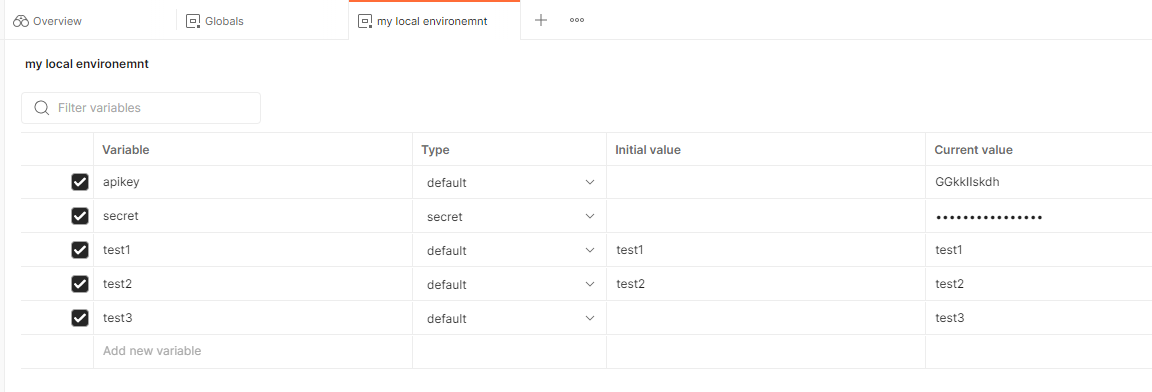
It is just this easy:use variables and do not fill the initial value!

Here the tests: 
First the local postman:

Second the browser postman:


As you can see: the current values are empty inside the cloud for all entries, which have the inital value not filled...
(By the way: the current value is always a copy of the inital value. If you put there something like test11 and test22, only test1 and test2 will show up in the cloud version).

Apr 9, 2023

LinkedIn: Microsoft 365 Backup for Dummies sponsored by Veeam

 This week Veeam published this booklet on linkedin.com for download:


The booklet contains 6 chapter - the last one is a summary "Six takeaways" like always in such "for dummies" books.

From my point of view chapter 1 & 2 can be skipped - this you should really know, if running M365 (motivation for M365 backup). 

Chapter 3 is about how the loss of files can be prevented with M365 mechanisms. This is about compliance center, retention policies and labels. But only the keywords are mentioned and no deeper insights are provided.

In chapter 4 many scenarios are described, how you can loose your data on M365. Here a quote:

I think this chapter can be skipped like chapter 1 & 2. 

Chapter 5 opens with a nice term which was new to me: BaaS - Backup as a Service. Never thought about this acronym. Completely clear, that some backups in cloud are done without having purchased storage or servers on premises. Nice thing inside this chapter: a checklist about data source, data properties and some others. Really nice.

Chapter 6 comes up with the takeaways. These are really worth reading.

Feb 20, 2023

LinkedIn: A Guide to Data Governance - Building a roadmap for trusted data

On linkedin from "The Cyber Security Hub" shared a nice booklet about data governance:


An like always: It is only a booklet with about 25 pages - so this is not really a deep dive into this topic, but it gives you a good overview and of course a good motivation:

These include the need to governdata to maintain its quality as well as the need to protect it. This entails the prerequisite need to discover data in your organization with cataloguing, scanning, and classifying your data to support this protection.

and if this is to abstract, you should consider the following use case (and i think this use case has to be considered):

However, for AI to become effective, the data it is using must be trusted. Otherwise decision accuracy may be compromised, decisions may be delayed, or actions missed which impacts on the bottom line. Companies do not want ‘garbage in, garbage out’.

The booklet contains the sections "Requirements for governing data in a modern enterprise", "components needed for data governance", "technology needed for end-to-end data governance" and "managing master data". All sections do not provide a walk through for achieving a good data governance, but there are many questions listed, which you should answer for your company and then move forward. 

If you already have a data governance in place: This book is a good challenge for your solution. And for sure you will find some points, which are missing :)


Feb 19, 2023

LinkedIn Topcs: Why dataverse is for everyone...

Today i got a notification from a Microsoft colleague about the following linkedin posting:


Some weeks ago i started with PowerApps - and there this "dataverse" was mentionend as well. 

If you walk through the presentation in this linkedin post, you get an idea what this dataverse can do. I found the following picture @Microsoft learn:

And there are more details, why and how dataverse can be used: https://learn.microsoft.com/en-us/power-apps/maker/data-platform/data-platform-intro#why-use-dataverse

Sounds like a kind of datawarehouse centrally in the cloud. The most interesting point (like always): How to maintain this data, so that it is really usable...


Feb 12, 2023

Review: "Cloud Native Infrastructure with Azure" provided by Microsoft

Last week Microsoft published the following linkedin post:

On linkedin often tiny booklets are offered with around 10 up to 30 pages. But this offer from Microsoft is a book with 11 section and 289 pages.
If you are interested you can get it via this link (today this is still working, 12.2.2023): https://azure.microsoft.com/en-us/resources/cloud-native-infrastructure-with-microsoft-azure/

If you are not convinced: Here the table of contents:

  1. Introduction: Why Cloud Native?
  2. Infrastructure as Code: Setting Up the Gateway
  3. Containerizing Your Application: More Than Boxes
  4. Kubernetes: The Grand Orchestrator
  5. Creating a Kubernetes Cluster in Azure
  6. Oberservability: Following the Breadcrumbs
  7. Service Discovery and Service Mesh: Finding New Territories and Crossing Borders
  8. Networking and Policy Management: Behold the Gatekeepers
  9. Distributed Databases and Storage: The Central Bank
  10. Getting the Message
  11. Serverless
  12. Conclusion

Sounds like many topics i want to read about... :)