Showing posts with label OS. Show all posts

Nov 5, 2022

Installation and running RaceResult Presenter.exe on Ubuntu

For all who are active in sports and want to run a event with www.raceresult.com:

In our case we have some Linux laptops which we want to use (Windows OS licenses missing).

RaceResult consists some some components

  • SEServer2.exe
  • Presenter.exe
  • CameraServer.exe
  • Transponder.exe
  • Moderator.exe
  • RRWS.exe

We want to run the Presenter.exe on a Linux box. So first step:

Install raceresult software with wine.

Preinstallation step:

winetricks vb6run

Installation step:

wine raceresult_12.4.25.0_386_stable.exe

(the exe is provided by raceresult)

Important thing: to run the Presenter.exe you need the SEServer2.exe running as well. Because RaceResult decided to let this server listen on port 1023, the installation has to be done twice. One with sudo and one without.

For the sudo installation please select all components. For the user installation only the presenter is needed (but you can go with all as well):

Then: start the SEServer 

sudo bash
cd /root/.wine/drive_c/Program Files (x86)/race result/race result 11/SEServer2
wine SEServer2.exe

Startup the presenter as well

cd ~/.wine/drive_c/Program Files (x86)/race result/race result 11/Presenter
wine Presenter.exe

Now the next tricky thing: You got a ses file from raceresult (rot.ses). Copy this in both .wine directories to ./wine/drive_c and the open this ses file in the presenter:


Bam done. :)

Sep 28, 2022

Ubuntu raspberry pi: upgrade to 22.04...

Ubuntu released version 22.04 so i decided to make an update from

Ubuntu 21.04 (GNU/Linux 5.11.0-1027-raspi aarch64)

to

Ubuntu 22.04.1 LTS (GNU/Linux 5.15.0-1015-raspi aarch64)

But this was not so easy as i thought. Running on my raspberry pi the following services were running:

  • influxdb
  • collectd
  • telegraf
  • mosquitto
  • zigbee2mqtt
  • grafana

Without any problem only grafana was updated.

Collectd failed with this message:

Package 'collectd' has no installation candidate

no chance to fix that :(

With that i had to disable the collectd section in influxdb - with that session it failed with 

influxd-systemd-start.sh[2293]: run: open server: open service: Stat(): stat /usr/share/collectd/types.db: no such file or directory

Then zigbee2mqtt was not able to write to mosquitto. This is due a change of the default settings of mosquitto. allow_anonymous false is now default, so i had to add

allow_anonymous true

After that zigbee2mqtt was able to write data to mqtt again.

Last thing: restart of telegraf, because just did not start properly after the first reboot after the upgrade.

Not really a good update - my other raspberry pi will stay on 21.04 for some more months...

Dec 27, 2021

Running a movie on an external DVD drive on a Chromebook (like HP x360)

In a first step this task sounds very easy:

  • watch a DVD on a chromebook

But...

What are the problems?

  1. Using an external drive to access the dvd
  2. No appropriate app available in play store or chrome web store

There are different solutions out there. 

  1. Convert the DVD to a mp4 and watch this
  2. Use VLC from play store --> does not recognize the DVD
  3. Use VLC from chrome web store --> does not start at all
  4. Use linux development environment

Option 4 seemed to me as the most promising way to go.

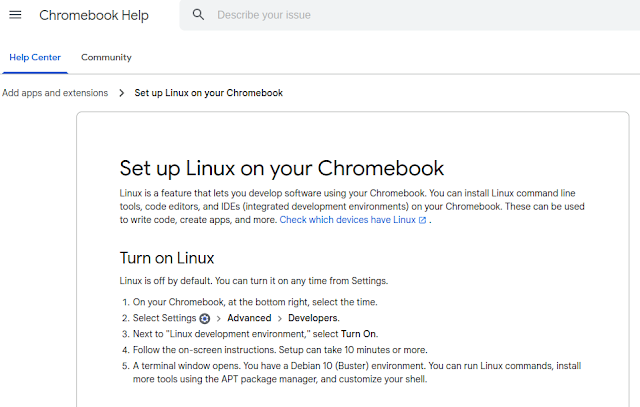
Setting up linux is very easy:

 After that you have a debian bullseye running inside a container. Go to /etc/apt/sources.list and add "contrib" after "deb https://debian.org/debian bullseye main " ("sudo bash" to get root). Then 

apt update
apt upgrade
apt install vlc libdvd-pkg
dpkg-reconfigure libdvd-pkg

After that vlc is configured including the libdvdcss for the DVD region codes.

One last problem is to access the DVD inside this linux container. This can be done via a double tap inside the file-manager on the chromebook and then you can choose inside the context menu "share with linux (Mit Linux teilen)".

This last step has to be done each time a DVD is inserted. 

So watching DVDs on a chromebook is not impossible, but it is not really user friendly...


Feb 3, 2021

Windows 10 & Office 2010: File Explorer crashes by clicking on a Office document

After an upgrade from whatever version to windows 10, Microsoft installs the office 365 apps. This leads to a crashing explorer (including a restart of the menu bar of the desktop).


The funny thing: If you start the word/excel/... first and then use the "open file" inside your office application everything works. The file chooser has no problem and does not freeze.

The solution is very easy:
Just deinstall the office 365 app. 

All the other solutions, which are proposed in the internet do not work. Like

  • Do a repair on your office application via system settings --> programs
  • Disable the preview feature for the file explorer
  • Disable custom shell extensions for the file explorer
  • Do a clean windows reinstall (<-- this was really a tip)

Sep 5, 2020

Cloning my dual boot ubuntu to a larger SSD

 After working a while with my laptop i reached the disk limit with my SSD (256GB). First impression: Oh no - how to migrate onto a new, larger SDD...

But the prices have dropped so i bought a 1TB SSD and an external SSD box:

Now i was thinking about copying the partitions with dd from the original disk to the other - or better doing a dd for the complete disk?

A friend offered me to use acronis, but the software refused to start on my laptop...

I googled a bit around and found the following solution (inspired by http://www.geekyprojects.com/storage/how-to-clone-hard-drive-to-smaller-drive/):

clonzilla.org

And this worked excellent.
After cloning my old ssd to the new one i removed the CD with clonzilla and my laptop immediately bootet from the new SSD which was still inside the SSD box.

Really cool!

I checked windows without replacing the SSD inside my laptop and this worked as well as the Ubuntu.

Next step was to boot with an GPARTED iso (can be found here) and resize the linux partition up to the new limits.

So last step was to open up my laptop and insert the 1TB SSD...

(Totally amazing that i did not have to run grub or change the uefi settings.)

Aug 16, 2019

Linux: Configuring hosts per ssh in parallel: pssh

If you have to set up some hosts in a way, that a number of commands has to be executed on each node, than you should consider PSSH:

http://manpages.ubuntu.com/manpages/bionic/man1/parallel-ssh.1.html

The installation is straight forward:
root@zerberus:~# apt-get install pssh
Paketlisten werden gelesen... Fertig
Abhängigkeitsbaum wird aufgebaut.       
Statusinformationen werden eingelesen.... Fertig
Die folgenden Pakete wurden automatisch installiert und werden nicht mehr benötigt:
  btrfs-tools geoip-database-extra libcryptui0a libjs-openlayers seahorse-daemon
Verwenden Sie »apt autoremove«, um sie zu entfernen.
Die folgenden NEUEN Pakete werden installiert:
  pssh
0 aktualisiert, 1 neu installiert, 0 zu entfernen und 8 nicht aktualisiert.
Es müssen 29,0 kB an Archiven heruntergeladen werden.
Nach dieser Operation werden 135 kB Plattenplatz zusätzlich benutzt.
Holen:1 http://de.archive.ubuntu.com/ubuntu bionic/universe amd64 pssh all 2.3.1-1 [29,0 kB]
Es wurden 29,0 kB in 0 s geholt (71,0 kB/s).
Vormals nicht ausgewähltes Paket pssh wird gewählt.
(Lese Datenbank ... 488993 Dateien und Verzeichnisse sind derzeit installiert.)
Vorbereitung zum Entpacken von .../archives/pssh_2.3.1-1_all.deb ...
Entpacken von pssh (2.3.1-1) ...
pssh (2.3.1-1) wird eingerichtet ...
Trigger für man-db (2.8.3-2ubuntu0.1) werden verarbeitet ...
But executing on ubuntu is a little bit tricky:
If you want to do a test, you have to know, that ubuntu has renamed the binary to parallel-ssh. pssh is not known at commandline:

schroff@zerberus:~$ parallel-ssh -i -H "localhost 127.0.0.1" ls -l .bashrc
[1] 00:04:48 [SUCCESS] 127.0.0.1
-rw-r--r-- 1 schroff schroff 3815 Jul 14  2017 .bashrc
[2] 00:04:48 [SUCCESS] localhost
-rw-r--r-- 1 schroff schroff 3815 Jul 14  2017 .bashrc
Please note the syntax highlighting, which i found very helpful:

May 1, 2018

Oracle Linux 7.5 released ?!

Oracle released its Linux in version 7.5 without a announcement on their webpages. If you ask google
oracle linux 7.5
you will be directed to this site:

But with the right search string you can find Oracle Linux 7.5 inside edelivery.oracle.com:

The new features can be found here:
or here:


Oct 7, 2017

Oracle Linux: How to change from uek to Red Hat compatible kernel

After a standard installation of Oracle Linux the uek kernel is bootet by default (unbreakable enterprise kernel).
# uname -a
Linux localhost.localdomain 4.1.12-94.3.9.el7uek.x86_64 #2 SMP Fri Jul 14 20:09:40 PDT 2017 x86_64 x86_64 x86_64 GNU/Linux
This behaviour can be changed with these commands:
First you have to get the linenumber of your new target kernel:
# grep ^menuentry /etc/grub2.cfg  | xargs printf '%s\n' |grep Oracle
Oracle Linux Server (4.1.12-94.3.9.el7uek.x86_64 with Unbreakable Enterprise Kernel) 7.4
Oracle Linux Server (3.10.0-693.el7.x86_64 with Linux) 7.4
Oracle Linux Server (0-rescue-2071bdecbf9a49e4b17d57fb4df518e8 with Linux) 7.4
In my case it is number 2: (3.10.0-....). But the numbering starts with 0. So i have to configure 1:
[root@localhost oracle]# grub2-set-default 1
[root@localhost oracle]# grub2-mkconfig -o /boot/grub2/grub.cfg
Generating grub configuration file ...
Found linux image: /boot/vmlinuz-4.1.12-94.3.9.el7uek.x86_64
Found initrd image: /boot/initramfs-4.1.12-94.3.9.el7uek.x86_64.img
Found linux image: /boot/vmlinuz-3.10.0-693.el7.x86_64
Found initrd image: /boot/initramfs-3.10.0-693.el7.x86_64.img
Found linux image: /boot/vmlinuz-0-rescue-2071bdecbf9a49e4b17d57fb4df518e8
Found initrd image: /boot/initramfs-0-rescue-2071bdecbf9a49e4b17d57fb4df518e8.img
done
And after a reboot you will get:
$ uname -a
Linux localhost.localdomain 3.10.0-693.el7.x86_64 #1 SMP Wed Aug 2 06:49:08 PDT 2017 x86_64 x86_64 x86_64 GNU/Linux

Please note: After this change you have to recompile virtualbox guest additions.

Oct 1, 2017

Virtualbox: How to use shared folders (aka gemeinsame Ordner)

If you want to use a directory inside a virtualbox vm without copying all files, you can use the shared folders.
Just choose a folder to share:

Then inside the vm type:
[root@localhost oracle]# mount -t vboxsf 12c /mnt
and that's it:
[root@localhost oracle]# df -h |grep 12c
12c                  180G    129G   52G   72% /mnt
or
[root@localhost oracle]# mount | grep 12c
12c on /mnt type vboxsf (rw,nodev,relatime)

When you are done just unmount the folder with
umount /mnt

Running Oracle Linux inside VirtualBox: Installation Virtualbox guest additions

First you have to insert the Virtualbox Guest Additions iso-image:
You can check this here:
 If this does not work, just add the iso into the IDE controller of virtualbox:

 As root you have to mount the image:


Before you can run the installer you have to get the following packages:

yum list kernel*
Take the one with "devel" which version matches:
uname -a
Linux localhost.localdomain 4.1.12-94.3.9.el7uek.x86_64 #2 SMP Fri Jul 14 20:09:40 PDT 2017 x86_64 x86_64 x86_64 GNU/Linux

Something like
yum install kernel-uek-devel-XXXXXX
Then install the follwing packages:
yum install dkms binutils gcc make patch libgomp glibc-headers glibc-devel bzip2
Then export KERN_DIR:

Finally you can run the installer VBboxLinuxAdditions.run:

Then a reboot and everything should be fine.
The walkthrough the Oracle Linux installation process can be found here.
(Preconfiguration steps for virtualbox can be found here

Running Oracle Linux inside VirtualBox: Installation

After configuring the HDD, RAM, network, etc on VirtualBox (take a look here), i started the VM:

 
 Choose "Install Oracle Linux7.4":

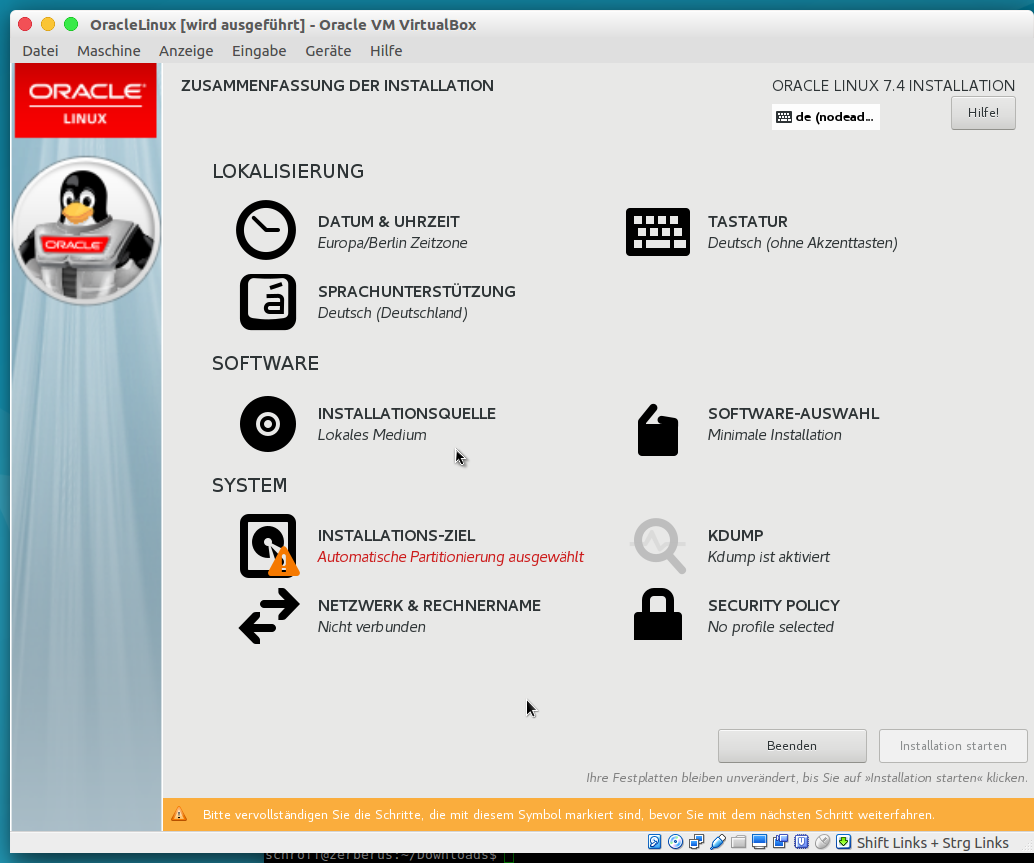
Language settings:
 Overview (partitioning and network missing):
 Network interface:
 Partitioning:
 Start package installation:
 Configure passwords / users:
 
 Waiting for reboot:
(Installation of the virtualbox guest additions can be found here)
(Preconfiguration steps for virtualbox can be found here)

Running Oracle Linux inside Virtualbox: Preconfiguration of the virtualization engine

This is a walkthrough the VirtualBox GUI settings to install Oracle Linux. First you have to name your VM and choose Oracle Linux 64 bit:
RAM:
HDD:
HDD type:
HDD dynamic/static:
HDD size:
After these steps you have to mount the iso image:

And you should configure a network adapter. I chose the WLAN interface of my laptop:

I will post the walkthrough the installation process soon.
(Installation of the virtualbox guest additions can be found here)

Sep 8, 2017

WLAN management with linux: networkmanager CLI "nmcli"

Configuring WLAN settings with the graphical user interface network manager is really easy.
Nevertheless sometimes it is necessary to configure the WLAN settings via a terminal. And therefore you should use nmcli:

To get a list of all available networks use "nmcli d wifi list"
$ nmcli d wifi list
*  SSID                 MODUS  CHAN  RATE       SIGNAL  BARS  SICHERHEIT
*  Gastzugang           Infra  12    54 Mbit/s  72      ▂▄▆_  WPA2      
   Napoleon Gastzugang  Infra  36    54 Mbit/s  27      ▂___  WPA1 WPA2 
   Napoleon Gastzugang  Infra  1     54 Mbit/s  25      ▂___  WPA1 WPA2 
   Napoleon             Infra  1     54 Mbit/s  25      ▂___  WPA2      
   Napoleon             Infra  36    54 Mbit/s  25      ▂___  WPA2      
   WLAN-901974          Infra  6     54 Mbit/s  24      ▂___  WPA2      
   Z                    Infra  11    54 Mbit/s  22      ▂___  WPA2      
   me5gast              Infra  3     54 Mbit/s  19      ▂___  WPA2      
You can get all saved connection via "nmcli c"
$ nmcli c
NAME                       UUID                                  TYP              GERÄT 
Gastzugang                 41d0717a-c4bc-47a4-acf7-bfa66dfa5462  802-11-wireless  wlp3s0
Kabelnetzwerkverbindung 1  316621ce-f61c-3163-a655-826306a79690  802-3-ethernet   --     
To connect to a wlan network "nmcli d wifi connect password
# nmcli d wifi connect Gastzugang password mypassword
Fehler: Aktivierung der Verbindung ist gescheitert: (7) Geheimdaten waren erforderlich, wurden aber nicht angegeben.
or with the right credentials:
Gerät »wlp3s0« wurde erfolgreich mit »754b6e6a-6284-4cf3-9737-13dd66f85b8e« aktiviert.


Aug 22, 2017

Customizing a CoreOS image/iso: Ignition

After the first steps with coreos (virtualbox installation) and a successful ssh login, it is clear, that the coreos image has to be customized. If not, every reboot will clean up every configuration provided after reboot.

CoreOS provides a coreos-install script to do this.
coreos-install -help
Usage: ./coreos-install [-C channel] -d /dev/device
Options:
    -d DEVICE   Install Container Linux to the given device.
    -V VERSION  Version to install (e.g. current) [default: current]
    -B BOARD    Container Linux board to use [default: amd64-usr]
    -C CHANNEL  Release channel to use (e.g. beta) [default: stable]
    -o OEM      OEM type to install (e.g. ami) [default: (none)]
    -c CLOUD    Insert a cloud-init config to be executed on boot.
    -i IGNITION Insert an Ignition config to be executed on boot.
    -b BASEURL  URL to the image mirror (overrides BOARD)
    -k KEYFILE  Override default GPG key for verifying image signature
    -f IMAGE    Install unverified local image file to disk instead of fetching
    -n          Copy generated network units to the root partition.
    -v          Super verbose, for debugging.
    -h          This ;-)

This tool installs CoreOS Container Linux on a block device. If you PXE booted
Container Linux on a machine then use this tool to make a permanent install.
First you have to add a 8GB partition to your core os installation:


Then enable ssh login (please refer to this posting). And transfer the coreos-install script and the following ingnition.json file:
{
  "ignition": {
    "version": "2.0.0",
    "config": {}
  },
  "storage": {},
  "systemd": {},
  "networkd": {},
  "passwd": {
    "users": [
      {
        "name": "core",
        "sshAuthorizedKeys": [
          "ssh-rsa AAAAB3NzaC....  "
        ]
      }
    ]
  }
}
Please use this validator to check your ignition.json!
And here we go:
core@localhost ~ $ ./coreos-install -d /dev/sda -i ignition.json
./coreos-install: Target block device (/dev/sda) is not writable (are you root?)
Ok.
sudo bash
bash-4.3#./coreos-install -d /dev/sda -i ignition.json
Downloading the signature for https://stable.release.core-os.net/amd64-usr/1409.6.0/coreos_production_image.bin.bz2...
wget --no-verbose -O /tmp/coreos-install.JROwzOsi1W/coreos_production_image.bin.bz2.sig https://stable.release.core-os.net/amd64-usr/1409.6.0/coreos_production_image.bin.bz2.sig
2017-08-22 19:01:28 URL:https://stable.release.core-os.net/amd64-usr/1409.6.0/coreos_production_image.bin.bz2.sig [543/543] -> "/tmp/coreos-install.JROwzOsi1W/coreos_production_image.bin.bz2.sig" [1]
Downloading, writing and verifying coreos_production_image.bin.bz2...
2017-08-22 19:02:31 URL:https://stable.release.core-os.net/amd64-usr/1409.6.0/coreos_production_image.bin.bz2 [288249718/288249718] -> "-" [1]
gpg: Signature made Thu Jul  6 01:34:01 2017 UTC
gpg:                using RSA key 07FA9ED31CB5FA26
gpg: key 50E0885593D2DCB4 marked as ultimately trusted
gpg: checking the trustdb
gpg: marginals needed: 3  completes needed: 1  trust model: pgp
gpg: depth: 0  valid:   1  signed:   0  trust: 0-, 0q, 0n, 0m, 0f, 1u
gpg: Good signature from "CoreOS Buildbot (Offical Builds) " [ultimate]
Installing Ignition config ignition.json...
Success! CoreOS Container Linux stable 1409.6.0 is installed on /dev/sda
Then umount the cd drive from your coreos virtual machine:


and reboot:
But this does not work:

Failed to start Ignition (disks)
and
See 'systemctl status ignition-disks.service'

Hmmm... I found nothing with google, so i file an issue at github:
https://github.com/coreos/bugs/issues/2118
And got a the solution within 6 minutes!!!

I missed the closing quite in line 14:
"ssh-rsa AAAAB3NzaC....  "
And now it worked:


Really cool...

If you are interested in more details please check this site:


Other posts around this topic: Core OS

  • Installing CoreOS on Virtualbox
  • Core OS - a minimal linux? A quick overview: diskspace, mounts, commands, kernel, ...
  • How to login via ssh (default password?!)
  • structure of the ISO image
  • Customizing a CoreOS image/iso: Ignition

  • CoreOS: structure of the ISO image

    After some first steps with CoreOS ("First step to micorservices: CoreOS on virtualbox") my problem is, how to customize CoreOS. After each reboot all changes are gone (tmpfs / squashfs).

    There are some tutorials which recommend the usage of etcd, but even this has to be configured into the CoreOS linux...

    The first idea: what about customizing the ISO image...

    mount -o loop coreos_production_iso_image.iso /media/iso
    Inside this:
    $ ls
    coreos  isolinux  syslinux
    du -sh *
    276M    coreos
    1,9M    isolinux
    2,5K    syslinux
    and inside the coreos directory:
    ls -l coreos
    insgesamt 282349
    -r--r--r-- 1 root root 253738975 Jul  6 03:47 cpio.gz
    -r--r--r-- 1 root root  35385632 Jul  6 03:47 vmlinuz
    Hmmm.
    $ gunzip cpio.gz
    $ cat cpio | cpio -idmv
    .
    usr.squashfs
    etc
    The directory etc is empty. And usr.sqashfs can be mounted:
    mount usr.squashfs /media/sqashfs
    and here we go:
    du -sh *
    221M    bin
    34M    boot
    512    lib
    240M    lib64
    18M    libexec
    2,5K    local
    0    lost+found
    512    postinst
    29M    sbin
    69M    share
    512    tmp
    I think modifying these files is not really helpful. Although there is no home directory to install my authorized_keys file.

    CoreOS itself states:
    But i hope there is another way without ignition to modify the coreos. Stay tuned ;-)


    Other posts around this topic: Core OS

  • Installing CoreOS on Virtualbox
  • Core OS - a minimal linux? A quick overview: diskspace, mounts, commands, kernel, ...
  • How to login via ssh (default password?!)
  • structure of the ISO image
  • Customizing a CoreOS image/iso: Ignition
  • Aug 20, 2017

    CoreOS: How to login via ssh (default password?!)

    After the installation of a coreos you want to login via ssh (because of wrong localization inside your virtualbox/vmware console and no client tools installed (copy/paste not working, etc...)?
    If you ask your preferred search engine, you will get many answers that there is not default password...
    (Of course! The idea behind containers and container schedulers is, that everything works automatically and typing passwords does not fit in this mantra).

    But no worries, only 4 steps are needed to get a login via ssh:

    1. on your laptop
      1. $ ssh-keygen
        Generating public/private rsa key pair.
        Enter file in which to save the key (/home/schroff/.ssh/id_rsa):
        Enter passphrase (empty for no passphrase):
        Enter same passphrase again:
        Your identification has been saved in /home/schroff/.ssh/id_rsa.
        Your public key has been saved in /home/schroff/.ssh/id_rsa.pub.
        The key fingerprint is:
        SHA256:xxxxxxxxxxxxxxxxxxxxxxxxxxx schroff@zerberus
        The key's randomart image is:
        +---[RSA 2048]----+
        xxxxxx
        +----[SHA256]-----+
      2. cp ~/.ssh/id_rsa.pub ~/.ssh/authorized_keys
    2. inside the coreos vm
      1.  scp schroff@:/.ssh/authorized_keys /home/core/.ssh
        schroff@xxxxxxx's password:
        authorized_keys                                               100%  398     0.4KB/s   00:00   
    3. on your laptop
      1. ssh core@
    With executing step 3.1 the login into the coreos machine works without a password, BUT ONLY up to the next reboot, because the home-directory is a tmpfs filesystem, which looses its content with each reboot...
    (Although you have to clean up your known hosts file, because the machine starts up with a new ssh key.)


    Other posts around this topic: Core OS

  • Installing CoreOS on Virtualbox
  • Core OS - a minimal linux? A quick overview: diskspace, mounts, commands, kernel, ...
  • How to login via ssh (default password?!)
  • structure of the ISO image
  • Customizing a CoreOS image/iso: Ignition
  • Aug 18, 2017

    Linux Containers - Container LInux: Core OS - a minimal linux? A quick overview: diskspace, mounts, commands, kernel, ...

    Virtualization techniques can be grouped into two categories
    1. os virtualization like VMware, Virtualbox, etc.
    2. container virtualization like Docker, etc.

    Everybody is familiar with the first category. Creation of virtual machines is well known and most of us have created already tens or hundreds of such machines. (and deleted and lost them after some weeks). One of the benefits is, that it is easy to run additional machines on our laptops / workstations.
    The second category is rarely used on laptops / workstations. This is something for computer rooms or data centers only.

    Both categories reduce the amount of hardware needed - but management of all theses virtual entities has still to be done.

    But for some workloads solutions are proposed like Kubernetes or Apache Mesos. Never heard about? ;-)

    Kubernetes orchestrates containers and Core OS is providing a minimal Container Linux operating system, which can be used by Kubernetes.
    Here my first expiriences with this minimal Linux system (for installation please refer to this posting):
    $ uname -a
    Linux localhost 4.11.9-coreos #1 SMP ......
    Diskspace used is only 244 megabytes:

    Filesystem      Size  Used Avail Use% Mounted on
    devtmpfs        361M     0  361M   0% /dev
    tmpfs           499M     0  499M   0% /dev/shm
    tmpfs           499M   13M  486M   3% /run
    tmpfs           499M     0  499M   0% /sys/fs/cgroup
    tmpfs           499M  8.0M  491M   2% /
    /dev/loop0      244M  244M     0 100% /usr
    tmpfs           499M     0  499M   0% /media
    tmpfs           499M     0  499M   0% /tmp
    tmpfs           100M     0  100M   0% /run/user/500
    Filesystems:
    ...
    tmpfs on / type tmpfs (rw,relatime,seclabel,mode=755)
    /usr.squashfs (deleted) on /usr type squashfs (ro,relatime,seclabel)
    selinuxfs on /sys/fs/selinux type selinuxfs (rw,relatime)
    tmpfs on /media type tmpfs (rw,nosuid,nodev,noexec,relatime,seclabel)
    tmpfs on /tmp type tmpfs (rw,nosuid,nodev,seclabel)
    ...

    Available commands /bin (/bin is a softlink to /usr/bin):
    core@localhost ~ $ ls /bin
    '['                                 ip                 rview
    actool                              ipcmk              rvim
    arch                                ipcrm              scanelf
    arping                              ipcs               scanmacho
    attr                                iptables-xml       sclient
    aulast                              isosize            scmp_sys_resolver
    aulastlog                           join               scp
    ausyscall                           journalctl         script
    autopoint                           jq                 scriptreplay
    auvirt                              js-config          sdiff
    awk                                 k5srvutil          sechecker
    base32                              kadmin             secon
    base64                              kbxutil            sed
    basename                            kdestroy           sediff
    bash                                kernel-install     seinfo
    bashbug                             keyctl             semodule_deps
    block-until-url                     kill               semodule_expand
    bootctl                             kinit              semodule_link
    bsdcat                              klist              semodule_package
    bsdcpio                             kmod               semodule_unpackage
    bsdiff                              kpasswd            seq
    bsdtar                              krb5-config        sesearch
    bspatch                             ksba-config        setarch
    bunzip2                             ksu                setfacl
    busctl                              kswitch            setfattr
    bzcat                               ktutil             setsid
    bzcmp                               kvno               setterm
    bzdiff                              last               sftp
    bzegrep                             lastb              sg
    bzfgrep                             lastlog            sh
    bzgrep                              ldapadd            sha1sum
    bzip2                               ldapcompare        sha224sum
    bzip2recover                        ldapdelete         sha256sum
    bzless                              ldapexop           sha384sum
    bzmore                              ldapmodify         sha512sum
    c_rehash                            ldapmodrdn         shlibsign
    cal                                 ldappasswd         shred
    captest                             ldapsearch         shuf
    captoinfo                           ldapurl            sim_client
    cat                                 ldapwhoami         slabtop
    catchsegv                           ldbadd             sleep
    cgpt                                ldbdel             sntp
    chacl                               ldbedit            sort
    chage                               ldbmodify          sotruss
    chattr                              ldbrename          split
    chcon                               ldbsearch          sprof
    chfn                                ldd                sqlite3
    chgrp                               lddtree            ssh
    chkcon                              less               ssh-add
    chmod                               lessecho           ssh-agent
    chown                               lesskey            ssh-copy-id
    chroot                              lesspipe           ssh-keygen
    chrt                                libassuan-config   ssh-keyscan
    chsh                                libgcrypt-config   sss_ssh_authorizedkeys
    cksum                               liblinear-predict  sss_ssh_knownhostsproxy
    clear                               liblinear-train    stat
    cmp                                 link               stdbuf
    col                                 linux32            strace
    colcrt                              linux64            strace-log-merge
    colrm                               ln                 stty
    column                              locale             su
    comm                                localectl          sudo
    containerd                          localedef          sudoedit
    containerd-shim                     locksmithctl       sudoreplay
    coredumpctl                         logger             sum
    coreos-cloudinit                    login              symcryptrun
    coreos-install                      loginctl           symtree
    coreos-metadata                     logname            sync
    cp                                  look               systemctl
    csplit                              ls                 systemd-analyze
    ctr                                 lsattr             systemd-ask-password
    curl                                lsblk              systemd-cat
    curl-config                         lscpu              systemd-cgls
    cut                                 lsipc              systemd-cgtop
    date                                lslocks            systemd-delta
    dbus-binding-tool                   lslogins           systemd-detect-virt
    dbus-cleanup-sockets                lsmod              systemd-escape
    dbus-daemon                         lsns               systemd-firstboot
    dbus-launch                         lsof               systemd-hwdb
    dbus-monitor                        lsscsi             systemd-inhibit
    dbus-run-session                    lsusb              systemd-machine-id-setup
    dbus-send                           lzcat              systemd-mount
    dbus-test-tool                      lzcmp              systemd-notify
    dbus-update-activation-environment  lzdiff             systemd-nspawn
    dbus-uuidgen                        lzegrep            systemd-path
    dd                                  lzfgrep            systemd-resolve
    delv                                lzgrep             systemd-run
    df                                  lzless             systemd-socket-activate
    dgawk                               lzma               systemd-stdio-bridge
    diff                                lzmadec            systemd-sysusers
    diff3                               lzmainfo           systemd-tmpfiles
    dig                                 lzmore             systemd-tty-ask-password-agent
    dir                                 machinectl         systemd-umount
    dircolors                           makedb             tabs
    dirmngr                             mayday             tac
    dirmngr-client                      mcookie            tail
    dirname                             md5sum             tailf
    dmesg                               mkdir              tar
    dnsdomainname                       mkfifo             taskset
    dnssec-dsfromkey                    mknod              tdbbackup
    dnssec-importkey                    mkpasswd           tdbdump
    dnssec-keyfromlabel                 mktemp             tdbrestore
    dnssec-keygen                       modinfo            tdbtool
    dnssec-revoke                       more               tee
    dnssec-settime                      mount              test
    dnssec-signzone                     mountpoint         tic
    dnssec-verify                       mpicalc            tickadj
    docker                              msgattrib          timedatectl
    docker-containerd                   msgcat             timeout
    docker-containerd-shim              msgcmp             tload
    docker-proxy                        msgcomm            toe
    docker-runc                         msgconv            toolbox
    dockerd                             msgen              top
    domainname                          msgexec            touch
    du                                  msgfilter          tpmd
    dumpelf                             msgfmt             tpmown
    dumpsexp                            msggrep            tput
    e2size                              msginit            tr
    echo                                msgmerge           true
    egrep                               msgunfmt           truncate
    eject                               msguniq            tset
    env                                 mv                 tsort
    envsubst                            namei              tty
    etcd2                               ncat               tzselect
    etcdctl                             ncurses5-config    udevadm
    ex                                  ncursesw5-config   ul
    expand                              net                umount
    expiry                              netcap             uname
    expr                                netstat            uname26
    factor                              networkctl         uncompress
    faillog                             newgidmap          unexpand
    fallocate                           newgrp             uniq
    false                               newrole            unlink
    fgrep                               newuidmap          unlzma
    filecap                             ngettext           unshare
    find                                nice               unxz
    findcon                             nisdomainname      unzip
    findmnt                             nl                 unzipsfx
    fleet                               nohup              update-ssh-keys
    fleetctl                            nproc              update_engine_client
    fleetd                              npth-config        uptime
    flock                               nsenter            usb-devices
    fmt                                 nslookup           usbhid-dump
    fold                                nspr-config        users
    free                                nss-config         utmpdump
    funzip                              nsupdate           uuclient
    gapplication                        ntp-keygen         uuidgen
    gawk                                ntpdc              vdir
    gdbus                               ntpq               vi
    gencat                              ntptime            view
    getconf                             numfmt             vim
    getent                              od                 vimdiff
    getfacl                             oldfind            vmstat
    getfattr                            openssl            w
    getopt                              passwd             watch
    gettext                             paste              watchgnupg
    gettext.sh                          pathchk            wc
    gettextize                          pcap-config        wdctl
    gflags_completions.sh               pcprofiledump      wget
    gio-querymodules                    pcre-config        whereis
    git                                 pcregrep           which
    git-cvsserver                       pcretest           who
    git-receive-pack                    pg                 whoami
    git-shell                           pgawk              whois
    git-upload-archive                  pgrep              x86_64
    git-upload-pack                     pidof              x86_64-cros-linux-gnu-curl-config
    glib-compile-resources              pinentry           x86_64-cros-linux-gnu-gpg-error-config
    glib-compile-schemas                pinentry-curses    x86_64-cros-linux-gnu-krb5-config
    glib-genmarshal                     pinentry-tty       x86_64-cros-linux-gnu-libgcrypt-config
    glib-gettextize                     ping               x86_64-cros-linux-gnu-nspr-config
    gmsgfmt                             ping6              x86_64-cros-linux-gnu-nss-config
    gobject-query                       pinky              x86_64-cros-linux-gnu-pcre-config
    gpasswd                             pkaction           x86_64-cros-linux-gnu-xml2-config
    gpg                                 pkcheck            xargs
    gpg-agent                           pkexec             xenstore
    gpg-connect-agent                   pkill              xgettext
    gpg-error                           pkttyagent         xml2-config
    gpg-error-config                    pldd               xmlcatalog
    gpg2                                pmap               xmllint
    gpgconf                             pr                 xmlwf
    gpgparsemail                        printenv           xtrace
    gpgscm                              printf             xz
    gpgsm                               prlimit            xzcat
    gpgtar                              protoc             xzcmp
    gpgv                                ps                 xzdec
    gpgv2                               pscap              xzdiff
    grep                                pspax              xzegrep
    gresource                           ptx                xzfgrep
    groups                              pwd                xzgrep
    gsettings                           pwdx               xzless
    gss-client                          quota              xzmore
    gtester                             quotasync          yes
    gunzip                              randstat           ypdomainname
    gzexe                               rbash              zcat
    gzip                                readlink           zcmp
    head                                realpath           zdiff
    hexdump                             recode-sr-latin    zdump
    hmac256                             rename             zegrep
    host                                renice             zfgrep
    hostid                              replcon            zforce
    hostname                            reset              zgrep
    hostnamectl                         rev                zic
    i386                                rkt                zip
    iconv                               rm                 zipcloak
    id                                  rmdir              zipgrep
    ifconfig                            rngtest            zipinfo
    igawk                               rootdev            zipnote
    indexcon                            route              zipsplit
    infocmp                             rpcgen             zless
    infotocap                           rsync              zmore
    install                             runc               znew
    ionice                              runcon

     Available commands /sbin (/sbin is a softlink to /usr/sbin):
    core@localhost ~ $ ls /sbin/
    adcli                getfilecon         modinfo                          sm-notify
    addgnupghome         getpcaps           modprobe                         ss
    addpart              getpidcon          mount.nfs                        sserver
    agetty               getsebool          mount.nfs4                       sshd
    applygnupgdefaults   getseuser          mpathpersist                     sss_cache
    arp                  groupadd           multipath                        sss_debuglevel
    auditctl             groupdel           multipathd                       sss_groupadd
    augenrules           groupmems          nameif                           sss_groupdel
    autrace              groupmod           newusers                         sss_groupmod
    avcstat              grpck              nfsidmap                         sss_groupshow
    badblocks            grpconv            nfsstat                          sss_override
    blkdeactivate        grpunconv          nologin                          sss_seed
    blkdiscard           gss-server         nscd                             sss_useradd
    blkid                halt               nstat                            sss_userdel
    blockdev             hwclock            ntpd                             sss_usermod
    brctl                iconvconfig        ntpdate                          sssd
    bridge               ifcfg              nvme                             start-statd
    btrfs                ifstat             open_init_pty                    sulogin
    btrfs-convert        init               osd_login                        swaplabel
    btrfs-debug-tree     insmod             pam_tally                        swapoff
    btrfs-find-root      ip6tables          pam_tally2                       swapon
    btrfs-image          ip6tables-apply    pam_timestamp_check              switch_root
    btrfs-map-logical    ip6tables-restore  parted                           sysctl
    btrfs-select-super   ip6tables-save     partprobe                        tc
    btrfs-show-super     ipmaddr            partx                            tcsd
    btrfs-zero-log       ipset              pdata_tools                      telinit
    btrfsck              iptables           pivot_root                       testsaslauthd
    btrfstune            iptables-apply     plipconfig                       thin_check
    cache_check          iptables-restore   pluginviewer                     thin_dump
    cache_dump           iptables-save      policyvers                       thin_metadata_size
    cache_metadata_size  iptunnel           poweroff                         thin_repair
    cache_repair         iscsi-iname        pvchange                         thin_restore
    cache_restore        iscsi_discovery    pvck                             thin_rmap
    capsh                iscsiadm           pvcreate                         togglesebool
    cfdisk               iscsid             pvdisplay                        tpm_hostpolicy
    cgdisk               iscsistart         pvmove                           traceroute6
    chcpu                kadmin.local       pvremove                         tune2fs
    checkarray           kadmind            pvresize                         umount.nfs
    chgpasswd            kdb5_util          pvs                              umount.nfs4
    chpasswd             kdump              pvscan                           unix_chkpwd
    compute_av           kexec              pwcheck                          unix_update
    compute_create       key.dns_resolver   pwck                             update-ca-certificates
    compute_member       kpartx             pwconv                           update_engine
    compute_relabel      kprop              pwunconv                         update_engine_stub
    compute_user         kpropd             quot                             useradd
    consoletype          kproplog           quotacheck                       userdel
    convertquota         krb5-send-pr       quotaoff                         usermod
    coreos-postinst      krb5kdc            quotaon                          uuidd
    coreos-setgoodroot   ldattach           quotastats                       uuserver
    coreos-tmpfiles      ldconfig           rarp                             veritysetup
    cryptsetup           lnstat             raw                              vgcfgbackup
    ctrlaltdel           load_policy        readprofile                      vgcfgrestore
    ctstat               logoutd            realm                            vgchange
    debugfs              logrotate          reboot                           vgck
    delpart              logsave            repquota                         vgconvert
    depmod               losetup            request-key                      vgcreate
    dhcpcd               lshw               resize2fs                        vgdisplay
    dmeventd             lsmod              resizepart                       vgexport
    dmsetup              lspci              restorecon                       vgextend
    dmstats              lvchange           rmmod                            vgimport
    dumpe2fs             lvconvert          rngd                             vgimportclone
    e2freefrag           lvcreate           routef                           vgmerge
    e2fsck               lvdisplay          routel                           vgmknodes
    e2image              lvextend           rpc.idmapd                       vgreduce
    e2label              lvm                rpc.mountd                       vgremove
    e2undo               lvmchange          rpc.nfsd                         vgrename
    e4defrag             lvmconf            rpc.rquotad                      vgs
    ebtables             lvmconfig          rpc.statd                        vgscan
    ebtables-restore     lvmdiskscan        rpcbind                          vgsplit
    edquota              lvmdump            rpcdebug                         vigr
    era_check            lvmetad            rpcinfo                          vipw
    era_dump             lvmsadc            rtacct                           visudo
    era_invalidate       lvmsar             rtcwake                          vmcore-dmesg
    era_restore          lvreduce           rtmon                            warnquota
    ethtool              lvremove           rtpr                             wipefs
    exportfs             lvrename           rtstat                           xfs_admin
    fdisk                lvresize           run_init                         xfs_bmap
    filefrag             lvs                runlevel                         xfs_copy
    findfs               lvscan             runuser                          xfs_db
    fixparts             matchpathcon       saslauthd                        xfs_estimate
    fsadm                mcstransd          sefcontext_compile               xfs_freeze
    fsck                 mdadm              selinux_check_securetty_context  xfs_fsr
    fsck.btrfs           mdassemble         selinuxexeccon                   xfs_growfs
    fsck.cramfs          mdmon              semodule                         xfs_info
    fsck.ext2            mii-tool           sestatus                         xfs_io
    fsck.ext3            mke2fs             setcap                           xfs_logprint
    fsck.ext4            mkfs               setenforce                       xfs_mdrestore
    fsck.ext4dev         mkfs.bfs           setfilecon                       xfs_metadump
    fsck.minix           mkfs.btrfs         setfiles                         xfs_mkfile
    fsck.xfs             mkfs.cramfs        setpci                           xfs_ncheck
    fsfreeze             mkfs.ext2          setquota                         xfs_quota
    fstrim               mkfs.ext3          setsebool                        xfs_repair
    gdisk                mkfs.ext4          sfdisk                           xfs_rtcp
    genhomedircon        mkfs.ext4dev       sgdisk                           xqmstats
    genl                 mkfs.minix         showmount                        xtables-multi
    getcap               mkfs.xfs           shutdown                         zramctl
    getconlist           mkhomedir_helper   sim_server
    getdefaultcon        mklost+found       slattach
    getenforce           mkswap             sln

    Other posts around this topic: Core OS


  • Installing CoreOS on Virtualbox
  • Core OS - a minimal linux? A quick overview: diskspace, mounts, commands, kernel, ...
  • How to login via ssh (default password?!)
  • structure of the ISO image
  • Customizing a CoreOS image/iso: Ignition