Showing posts with label Android. Show all posts

Dec 27, 2021

Running a movie on an external DVD drive on a Chromebook (like HP x360)

In a first step this task sounds very easy:

  • watch a DVD on a chromebook

But...

What are the problems?

  1. Using an external drive to access the dvd
  2. No appropriate app available in play store or chrome web store

There are different solutions out there. 

  1. Convert the DVD to a mp4 and watch this
  2. Use VLC from play store --> does not recognize the DVD
  3. Use VLC from chrome web store --> does not start at all
  4. Use linux development environment

Option 4 seemed to me as the most promising way to go.

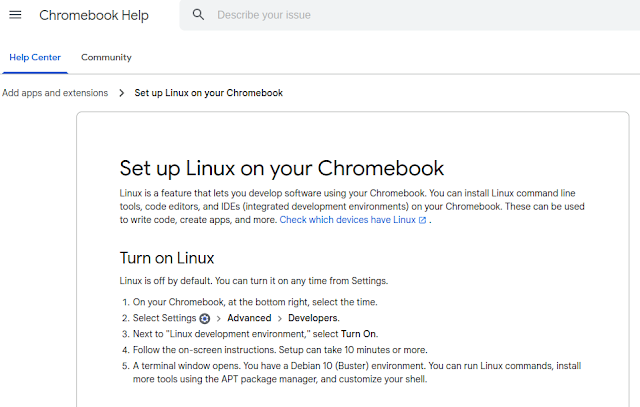
Setting up linux is very easy:

 After that you have a debian bullseye running inside a container. Go to /etc/apt/sources.list and add "contrib" after "deb https://debian.org/debian bullseye main " ("sudo bash" to get root). Then 

apt update
apt upgrade
apt install vlc libdvd-pkg
dpkg-reconfigure libdvd-pkg

After that vlc is configured including the libdvdcss for the DVD region codes.

One last problem is to access the DVD inside this linux container. This can be done via a double tap inside the file-manager on the chromebook and then you can choose inside the context menu "share with linux (Mit Linux teilen)".

This last step has to be done each time a DVD is inserted. 

So watching DVDs on a chromebook is not impossible, but it is not really user friendly...


Jan 27, 2021

Signal: Data backup of newer signal versions cannot be imported


I switched from Whatsapp to Signal (in terms of many communications are now on signal, but still some are left on Whatsapp) and afterwards i moved to a new smartphone.

But while doing the restore procedure for the backup (take a look here) i got this error:

Data backup of newer signal versions cannot be imported

or in german

Datensicherungen neuerer Signal-Versionen können nicht importiert werden


I investigated the version numbers on android playstore and both were 5.2.3.

On my new smartphone the android os was not on the latest release (on this new smartphone there was still some outstanding os versions to install).

But nothing did the job - i asked signal support, so let's see, what they are telling me...

EDIT: Even deinstalling signal on my old smartphone and reinstalling signal showed this error message...

Dec 31, 2020

Samsung A50: boot loop problem after last Samsung OS update

 I used a Samsung A50 for nearly 1,5 years and was very satisfied with the device. 128GB internal storage and dual sim - i do not need more :)

But last week the monthly "security" update was done by Samsung and after booting the new OS everything seems to fine. But only a few hours later (i did not install any new software - was just browsing in the web on my favourite news page) the smartphone froze and after that it keeps showing this screen for hours:

With pressing "Volume Up" and "Power" i was able to open the recovery mode, but after a factory reset, still the boot screen is shown...

Anyone else with this problem? Please leave a comment!


Jun 13, 2020

Google GSI: Generic System Images for Smartphones

After building my own ROM i got some problems with the devices drivers for the modem (the dual SIM was not recognized).
I discussed that with a few very skilled Android developers and the device drivers are the most important problem for building ROMs.

But there is something called GSI: Generic System Images.

(s. https://source.android.com/setup/build/gsi)

and:

The good point is that for my Samsung J530 there was a developer which built a project which allows to install GSIs:


With this plus Havoc 3.5


And here the steps to Android 10 (which where provided to me by Micro[ice]:
  1. install TWRP 3.3.0
  2. install create vendor 2.0
  3. reboot recovery
  4. install project spaget x
    (if u get symlink error 7 flash revert vendor 2.0 and repeat from step 1 without revert vendor 2.0)
  5. install GSI (Havoc)-OS to system partition
    (dont reboot after u flash project spaget x)
  6. if u need to flash gapps first u need to go
    Wipe -> Advanced Wipe -> Tick System -> Repair -> Resize
    (if u get error 1 resize again it will be successful) then u flash gapps
  7. (optional) flash areskernel rc2
  8. (optional) flash magisk
  9. reboot
  10. enjoy
And after that i have a running Android 10 on my Samsung J5... (without any Samsung Bloatware)

Jun 5, 2020

Lineage OS: Building my own system from scratch...

For my Samsung J5 is was only able to find a lineage 15.1 image but no lineage 16 or even 17.
So i decided to build the image on my own.

I followed this guide:
https://github.com/lineage-doge/device-j5y17lte/tree/lineage-16.0

But on this page the roomservice.xml is wrong:


Just change it to


The rest was following the instructions:
mkdir -p android/lineage-16.0
cd android/lineage-16.0
repo init -u git://github.com/LineageOS/android.git -b lineage-16.0
repo sync

Create .repo/local_manifests/roomservice.xml with the content shown above.
Then run "repo sync" once again.

Most important point it to extract the binaries from your device. To get a background just read this:
https://wiki.lineageos.org/extracting_blobs_from_zips.html


I extracted /system from my Android device via TWRP (under advanced you can find a file explorer and this can copy the partition to your sd card).
After that point STOCK_ROM_DIR to your sd card and run:
cd device/samsung/j5y17lte
STOCK_ROM_DIR=/path/to/system ./extract-files.sh
Now we are ready to rumble:
cd ../../
source build/envsetup.sh
brunch lineage_j5y17lte-userdebug
But after some minutes:
LD      kernel/built-in.o
/media/schroff/895337b7-c4eb-44a4-9063-00f629e5149f/lineage-16.0/kernel/samsung/exynos7870/drivers/net/wireless/Makefile:62: android version 1: 90000
/media/schroff/895337b7-c4eb-44a4-9063-00f629e5149f/lineage-16.0/kernel/samsung/exynos7870/drivers/net/wireless/Makefile:63: MAJOR_VERSION version 1: 9
/media/schroff/895337b7-c4eb-44a4-9063-00f629e5149f/lineage-16.0/kernel/samsung/exynos7870/drivers/net/wireless/Makefile:107: platform version 3 : 9.0.0
/media/schroff/895337b7-c4eb-44a4-9063-00f629e5149f/lineage-16.0/kernel/samsung/exynos7870/drivers/net/wireless/Makefile:108: MAJOR_VERSION version 3: 9
  LD      drivers/built-in.o
make[1]: Leaving directory '/media/schroff/895337b7-c4eb-44a4-9063-00f629e5149f/lineage-16.0/out/target/product/j5y17lte/obj/KERNEL_OBJ'
Makefile:145: recipe for target 'sub-make' failed
make: *** [sub-make] Error 2
make: Leaving directory '/media/schroff/895337b7-c4eb-44a4-9063-00f629e5149f/lineage-16.0/kernel/samsung/exynos7870'
[  1% 555/35382] target StaticLib: libv8src_32 (/media/schroff/895337b7-c4eb-44a4-...arget/product/j5y17lte/obj_arm/STATIC_LIBRARIES/libv8src_intermediates/libv8src.a)
ninja: build stopped: subcommand failed.
19:21:20 ninja failed with: exit status 1

#### failed to build some targets (05:29 (mm:ss)) ####
But this error is easy to fix:
cd ~/android/lineage-16.0/out/target/product/j5y17lte/obj/KERNEL_OBJ/firmware/tsp_imagis
cp ~/android/lineage-16.0/kernel/samsung/exynos7870/firmware/tsp_imagis/ist3038h_a3x_cmcs.bin .
~/android/lineage-16.0/kernel/samsung/exynos7870/firmware/tsp_imagis/ist3038h_a3x.fw .
schroff@zerberus:~/android/lineage-16.0/out/target/product/j5y17lte/obj/KERNEL_OBJ/firmware/tsp_imagis$

and try once again!

And after a while:
  Imgdiff Stats Report 
========================

Compressing system.new.dat with brotli
  running:  brotli --quality=6 --output=/tmp/tmpAOkKFk/system.new.dat.br /tmp/tmpAOkKFk/system.new.dat
using prebuilt boot.img from BOOTABLE_IMAGES...
  running:  java -Xmx2048m -Djava.library.path=/media/schroff/895337b7-c4eb-44a4-9063-00f629e5149f/lineage-16.0/out/host/linux-x86/lib64 -jar /media/schroff/895337b7-c4eb-44a4-9063-00f629e5149f/lineage-16.0/out/host/linux-x86/framework/signapk.jar -w build/target/product/security/testkey.x509.pem build/target/product/security/testkey.pk8 /tmp/tmptUxdfx.zip /tmp/tmpSgxnBy.zip
  running:  zip -d /tmp/tmpSgxnBy.zip META-INF/com/android/metadata
  running:  java -Xmx2048m -Djava.library.path=/media/schroff/895337b7-c4eb-44a4-9063-00f629e5149f/lineage-16.0/out/host/linux-x86/lib64 -jar /media/schroff/895337b7-c4eb-44a4-9063-00f629e5149f/lineage-16.0/out/host/linux-x86/framework/signapk.jar -w build/target/product/security/testkey.x509.pem build/target/product/security/testkey.pk8 /tmp/tmpSgxnBy.zip /media/schroff/895337b7-c4eb-44a4-9063-00f629e5149f/lineage-16.0/out/target/product/j5y17lte/lineage_j5y17lte-ota-eng.schroff.zip
done.
[100% 453/453] build bacon
Package Complete: /media/schroff/895337b7-c4eb-44a4-9063-00f629e5149f/lineage-16.0/out/target/product/j5y17lte/lineage-16.0-20200502-UNOFFICIAL-j5y17lte.zip

#### build completed successfully (27:31 (mm:ss)) ####


May 31, 2020

Custom ROMs: Installing via TWRP (e.g. Prometheus ROM)

After installing TWRP and installing some ROMs via adb sideload, (or this story with my old Nexus 7) i learned that there is another way for installing Custom ROMs:

  • Boot in to recovery (Samsung: Home Button + Power + Volume Up)
  • Copy the ROM.zip to the SD card of the smartphone
  • and then follow this screenshots
Click on "Install"

Click "Select Storage"

Select your SD card

Select the ROM you want to install:

Swipe to the right

Then some of the ROMs (like Prometheus) will guide you through an installation wizard, where you can chose some options.

If you want to try Prometheus you can download it here.

May 18, 2020

Building my own Recovery ROM for a Samsung J5 2017 (j5y17lte, TWRP)

After several hours of sideloading a custom ROM and flashing a TWRP recovery image i thought the next step is to build a TWRP recovery image on my own.


So how to do that?

My startpoint was
(just search github for your device with TWRP)

But this is not the way to begin.
First you have to follow this page:
and do
repo init -u git://github.com/minimal-manifest-twrp/platform_manifest_twrp_omni.git -b twrp-7.1
and
repo sync
Then add the j5y17lte.xml to .repo/local_manifests. After that the repo sync works but the
$ lunch omni_j5y17lte-eng
ends up with a warning:

WARNING: device/samsung/j5y17lte/omni.dependencies file not found
============================================
PLATFORM_VERSION_CODENAME=REL
PLATFORM_VERSION=7.1.2
TARGET_PRODUCT=omni_j5y17lte
TARGET_BUILD_VARIANT=eng
TARGET_BUILD_TYPE=release
TARGET_BUILD_APPS=
TARGET_ARCH=arm64
TARGET_ARCH_VARIANT=armv8-a
TARGET_CPU_VARIANT=cortex-a53
TARGET_2ND_ARCH=arm
TARGET_2ND_ARCH_VARIANT=armv7-a-neon
TARGET_2ND_CPU_VARIANT=cortex-a53
HOST_ARCH=x86_64
HOST_2ND_ARCH=x86
HOST_OS=linux
HOST_OS_EXTRA=Linux-4.15.0-88-generic-x86_64-with-Ubuntu-18.04-bionic
HOST_CROSS_OS=windows
HOST_CROSS_ARCH=x86
HOST_CROSS_2ND_ARCH=x86_64
HOST_BUILD_TYPE=release
BUILD_ID=NJH47F
OUT_DIR=/media/schroff/895337b7-c4eb-44a4-9063-00f629e5149f/omni/out
============================================

The good point: just ignore this warning and do the mka recoveryimage.

Here i got two errors:

/bin/bash -c "prebuilts/misc/linux-x86/flex/flex-2.5.39 -oout/target/product/generic/obj/STATIC_LIBRARIES/libedify_intermediates/lexer.cpp bootable/recovery/edify/lexer.ll"
flex-2.5.39: loadlocale.c:130: _nl_intern_locale_data: Assertion `cnt < (sizeof (_nl_value_type_LC_TIME) / sizeof (_nl_value_type_LC_TIME[0]))' failed.
Aborted (core dumped)

Here i followed this hint:
https://groups.google.com/forum/?hl=tr#!topic/android-building/0kzPnw3akxg
and copied the provided flex to "prebuilts/misc/linux-x86"
   cp ~/Downloads/build/flex flex-2.5.39
You have to change the name from flex to flex-2.5.39 and you have to rerun source build/envsetup.sh again.

Then i got the following errors:

bootable/recovery/gui/../twrp-functions.hpp:24:10: fatal error: 'ext4_utils/ext4_crypt.h' file not found
bootable/recovery/gui/../twrp-functions.hpp:24:10: error: 'ext4_utils/ext4_crypt.h' file not found with <angled> include; use "quotes" instead
bootable/recovery/twrp.cpp:49:10: fatal error: 'base/strings.h' file not found
This i could resolve with:

cd bootable/recovery
ln -s ../../system/extras/ext4_utils
vi twrp-functions.hpp # add the quotes!
ln -s ../../system/core/base/include/android-base base

After that the build went through and i got a TWRP image:
-rw-rw-r--  1 schroff schroff 26937344 Mai 17 23:40 recovery.img
This ran without a problem on my J5 after a
heimdall flash --RECOVERY recovery.img


May 16, 2020

Samsung J5 2017 (aka j5y17lte) installing STOCK ROM

After installing a custom ROM (s. here) i wanted to flash the STOCK  ROM onto my smartphone again.
So what to do?

First: Download a ROM (e.g. sammobile.com)

and you will get something like
J530FXXU6CSK9_J530FDBT6CSL1_DBT.zip
this zip cannot be sideloaded. So you have to unzip and the you have:
AP_J530FXXU6CSK9_CL16642474_QB27583084_REV00_user_low_ship_meta_OS9.tar.md5
BL_J530FXXU6CSK9_CL16642474_QB27583084_REV00_user_low_ship.tar.md5
CP_J530FXXU6CSK9_CP14486297_CL16642474_QB27583084_REV00_user_low_ship.tar.md5
CSC_DBT_J530FDBT6CSL1_CL17419960_QB27658856_REV00_user_low_ship.tar.md5
HOME_CSC_DBT_J530FDBT6CSL1_CL17419960_QB27658856_REV00_user_low_ship.tar.md5
Within this you have to do a:
 for a in *md5; do echo $a;  tar -xvf $a; done
and the result should be:
boot.img   cm.bin      modem.bin  recovery.img  system.img
cache.img  hidden.img  param.bin  sboot.bin     userdata.img
or just type:

~/bin/heimdall flash --BOOT boot.img --SYSTEM system.img --CACHE cache.img --HIDDEN hidden.img --PARAM param.bin --CM cm.bin --USERDATA userdata.img --RADIO modem.bin --BOOTLOADER sboot.bin --RECOVERY recovery.img
and after nearly 10 minutes of anxious waiting you J5 boots up with the STOCK ROM again.

May 2, 2020

My Samsung Galaxy J5 (2017) aka j5y17lte with lineage os

In the last weeks i did some tests with installing custom ROMs to my old devices:
and
The next step was to try this with my Samsung J5:
root@zerberus:~/bin# ./heimdall print-pit
Heimdall v1.4.2

Copyright (c) 2010-2017 Benjamin Dobell, Glass Echidna
http://www.glassechidna.com.au/

This software is provided free of charge. Copying and redistribution is
encouraged.

If you appreciate this software and you would like to support future
development please consider donating:
http://www.glassechidna.com.au/donate/

Initialising connection...
Detecting device...
Claiming interface...
Setting up interface...

Initialising protocol...
Protocol initialisation successful.

Beginning session...

Some devices may take up to 2 minutes to respond.
Please be patient!

Session begun.

Downloading device's PIT file...
PIT file download successful.

Entry Count: 29
Unknown 1: 1598902083
Unknown 2: 844251476
[.....]
File Size (Obsolete): 0
Partition Name: USERDATA
Flash Filename: userdata.img
FOTA Filename: remained

Ending session...
Rebooting device...
Releasing device interface...
But for the next step (flashing the boatloader with TWRP) i got the follwoing error:
root@zerberus:~/bin# ./heimdall flash --RECOVERY ../Downloads/twrp-3.3.1-1-j5nlte.img --no-reboot
Heimdall v1.4.2

Copyright (c) 2010-2017 Benjamin Dobell, Glass Echidna
http://www.glassechidna.com.au/

This software is provided free of charge. Copying and redistribution is
encouraged.

If you appreciate this software and you would like to support future
development please consider donating:
http://www.glassechidna.com.au/donate/

Initialising connection...
Detecting device...
Claiming interface...
Setting up interface...

Initialising protocol...
Protocol initialisation successful.

Beginning session...

Some devices may take up to 2 minutes to respond.
Please be patient!

Session begun.

Downloading device's PIT file...
PIT file download successful.

Uploading RECOVERY
100%
RECOVERY upload successful

Ending session...
ERROR: Failed to receive session end confirmation!
Releasing device interface...
The smartphone showed this:
  
RMM STATE: Prenormal
KG STATE: Checking
Only official released binaries are allowed to be flashed(RECOVERY)
KG = Knox Guard
RMM = Remote Monitoring and Management
(https://chimeratool.com/fr/docs/samsung-knox-guard-kg-and-remote-monitoring-and-management-rmm-unlock-functions)

I found a solution for this problem (https://www.android-hilfe.de/forum/root-custom-roms-modding-fuer-samsung-galaxy-s9-s9.3273/s9-sm-g960f-nach-android-9-kein-installieren-von-custom-recoverys-moeglich.898725.html): It just says: wait 7 days...

Grrrrr!!!!!!!

And after 7 days:
And then:

 /bin# ./heimdall flash --RECOVERY ../AndroidDevices/TWRP-3.2.3-TwrpBuilder-j5y17lte-2018-09-13_15-34.img  --no-reboot

Heimdall v1.4.2
Copyright (c) 2010-2017 Benjamin Dobell, Glass Echidna
http://www.glassechidna.com.au/

This software is provided free of charge. Copying and redistribution is
encouraged.

If you appreciate this software and you would like to support future
development please consider donating:
http://www.glassechidna.com.au/donate/

Initialising connection...
Detecting device...
Claiming interface...
Setting up interface...

Initialising protocol...
Protocol initialisation successful.

Beginning session...

Some devices may take up to 2 minutes to respond.
Please be patient!

Session begun.

Downloading device's PIT file...
PIT file download successful.

Uploading RECOVERY
100%
RECOVERY upload successful

Ending session...
Releasing device interface...

And after that i was able to install the lineage os plus the Google playstore:

adb sideload ../Downloads/lineage-15.1-20180510-UNOFFICIAL-j5y17lte.zip
adb sideload open_gapps-arm-8.1-j5y17lte-pico-20200418.zip
The only problem:
Only an unofficial lineage version 15.1 was available for the Samsung J5 2017 aka "j5y17lte". I found one build with version 16 but there the WLAN was broken...

So this was a step back from Android 9 to Android 8.1 - but system space moved from 800MB free to 7GB free ;-)

Apr 24, 2020

GPay and TWRP: NFC payment not possible / forbidden

After flashing my old Samsung smartphone to TWRP (s. this posting) and before installing a custom OS, i did some tests with the original Android OS.
Everything worked but GPay refuses to work:


Your Phone can't make contactless payments
Check your phone software to see if it meets standards
Check software"
and the button "Check software" opens this popup:


Your phone doesn't meet software standards

You can't make contactless payments with this device. It may be rooted or running uncertified software. Contact your device manufacturer or visit Google Pay Help for more info.You can still use Google Pay to pay online.
OK
So GPay does not only check the OS - it checks the bootloader, too.
Even if you did not rooting/jailbreaking your OS...

Apr 16, 2020

My Nexus 7 (2012) is online again (with lineageos and external battery)

In 2014 i did the last update for my Nexus 7 (s. here).
It was the last update which was provided by Google for this device:
I bought the Nexus 7 seven and a half year ago and on the weekend i found the tablet in the back of the cupboard. It did not work, because the battery was completely discharged and the device refused to charge it.
Without a battery it is not possible to startup the device - only power over USB is not enough.

So i disassembled it like described here and added some cables to connect a battery from outside:

And with that modification i was able to start it  - but running Android 5 with 8GB disk space is no fun.
So i booted TWRP onto this device:

root@zerberus:~/bin# fastboot oem unlock
                                                   (bootloader) erasing userdata...
(bootloader) erasing userdata done
(bootloader) erasing cache...
(bootloader) erasing cache done
(bootloader) unlocking...
(bootloader) Bootloader is unlocked now.
OKAY [193.432s]
Finished. Total time: 193.433s

root@zerberus:~/bin#fastboot boot  ~/Downloads/twrp-3.0.2-0-grouper.img
After that i was able to install lineageOS via adb sideload.

 adb sideload  ~/Downloads/lineage-14.1-20171122_224807-UNOFFICIAL-aaopt-grouper.zip 
 adb sideload  ~/Downloads/open_gapps-arm-7.1-pico-20200415.zip 
Now the device has nearly 6GB space left:

 I can use the play store and the device runs on Android version 7 - and it runs youtube movies without any interruptions...


Apr 4, 2020

Smartphone: Installing lineageOS + Googles Play Store (and getting 9GB system space freed up)


After installing TWRP as bootloader i was wondering, how much effort is is to install an alternative to android on my old smartphone.

Heimdall & ADB were in place (see TWRP posting) - so let's start!

I downloaded the appropriate image from https://lineageos.org/ and i did the following on my smartphone:
Click on "Wipe"
 Click on "Format Data"
 Type "Yes"
 Wait
 Step two times back and click "advanced wipe"
Choose "Cache" and "System" and swipe to the left

Step back to home screen and choose "Advanced"

 Choose ADB sideload & Swipe to the left

and then type:

sudo ./adb sideload ~/Downloads/lineage-16.0-20200325-nightly-a3xelte-signed.zip 

[sudo] password for schroff: 

Total xfer: 1.02x                                                                                  
and then REBOOT...
(if you want a clean lineage OS)

If you want the google play store, then go to https://opengapps.org/


Download the appropriate package (i chose "pico" - https://github.com/opengapps/opengapps/wiki/Package-Comparison)

Then repeat the steps on TWRP (smartphone) for sideloading and type

sudo ./adb sideload ~/Downloads/open_gapps-arm-9.0-pico-20200403.zip

Total xfer: 1.43x                      


And after that the smartphone starts up with lineage OS and play store (To avoid problems: do not connect to mobile networks neither wifi within the startup wizard - this can result in a black screen and the wizard will never end).
The best thing: with Samsungs stock Android about 13GB was blocked by the system. Now only 4GB from 16GB are used. So i got additional 9GB free space. Really cool!

Apr 3, 2020

Using a custom bootloader for my smartphone: TWRP on Samsung Galaxy A3

I read about /e/ some days ago and i decided to install this on my old smartphone (a samsung A3).

So first: What is /e/?
https://doc.e.foundation/
So i started at

https://doc.e.foundation/devices/a3xeltexx/install
where i learned, that i have to install a custom bootloader on my smartphone. This is very good explained at /e/:

(You will find there the description how to install "heimdall" and "adb")

schroff@zerberus:~/bin$ sudo ./heimdall flash --verbose --RECOVERY ~/Downloads/twrp-3.3.0-0-a3xelte.img --no-reboot
Heimdall v1.4.2

Copyright (c) 2010-2017 Benjamin Dobell, Glass Echidna
http://www.glassechidna.com.au/

This software is provided free of charge. Copying and redistribution is
encouraged.

If you appreciate this software and you would like to support future
development please consider donating:
http://www.glassechidna.com.au/donate/

Initialising connection...
Detecting device...
      Manufacturer: "SAMSUNG"
           Product: "Gadget Serial"

            length: 18
      device class: 2
               S/N: 0
           VID:PID: 04E8:685D
         bcdDevice: 021B
   iMan:iProd:iSer: 1:2:0
          nb confs: 1

interface[0].altsetting[0]: num endpoints = 1
   Class.SubClass.Protocol: 02.02.01
       endpoint[0].address: 83
           max packet size: 0010
          polling interval: 09

interface[1].altsetting[0]: num endpoints = 2
   Class.SubClass.Protocol: 0A.00.00
       endpoint[0].address: 81
           max packet size: 0200
          polling interval: 00
       endpoint[1].address: 02
           max packet size: 0200
          polling interval: 00
Claiming interface...
Setting up interface...

Initialising protocol...
Protocol initialisation successful.

Beginning session...

Some devices may take up to 2 minutes to respond.
Please be patient!

Session begun.

Downloading device's PIT file...
WARNING: Empty bulk transfer after receiving packet failed. Continuing anyway...
PIT file download successful.

Uploading RECOVERY
0%ERROR: Failed to unpack received packet.

ERROR: Failed to receive file part response!
3%
7%
10%
14%
17%
21%
25%
28%
32%
35%
39%
42%
46%
50%
53%
57%
60%
64%
68%
71%
75%
78%
82%
85%
89%
93%
96%
100%
RECOVERY upload successful

Ending session...
Releasing device interface...
and then:
For more information take a look at https://twrp.me/

Aug 11, 2018

Ubuntu / Linux: WLAN connections fails with "denied authentication (status 17)"

During holidays i was not able to connect my laptop to the WLAN.
The /var/log/syslog showed the following:
Jul 15 13:45:20 pc wpa_supplicant[935]: wlp3s0: SME: Trying to authenticate with 14:9d:09:fe:a4:b3 (SSID='HUAWEI BTV' freq=2437 MHz)
Jul 15 13:45:20 pc kernel: [ 6972.826888] wlp3s0: authenticate with 14:9d:09:fe:a4:b3
Jul 15 13:45:20 pc NetworkManager[797]:   [1531655120.4746] device (wlp3s0): supplicant interface state: disconnected -> authenticating
Jul 15 13:45:20 pc kernel: [ 6972.829942] wlp3s0: send auth to 14:9d:09:fe:a4:b3 (try 1/3)
Jul 15 13:45:20 pc kernel: [ 6972.833433] wlp3s0: 14:9d:09:fe:a4:b3 denied authentication (status 17)
Jul 15 13:45:20 pc wpa_supplicant[935]: wlp3s0: CTRL-EVENT-SSID-TEMP-DISABLED id=0 ssid="HUAWEI BTV" auth_failures=1 duration=10 reason=CONN_FAILED
Jul 15 13:45:20 pc NetworkManager[797]:   [1531655120.5031] device (wlp3s0): supplicant interface state: authenticating -> disconnected
Jul 15 13:45:20 pc org.freedesktop.Notifications[1248]: ** (notify-osd:1448): WARNING **: dnd_is_idle_inhibited(): got error "The name org.gnome.SessionManager was not provided by any .service files"
Hmmm.
STATUS 17
What the hell does this error code tell me?

The explanation was quite easy: The WLAN was provided by a tablet via tethering. And Android limits the number of devices in such a WLAN to 5.
After removing one of the other devices everything worked fine...


Nov 18, 2014

Android Update: 5.0

Today my Nexus 7 got the upgrade to Android 5.0:
 After this upgrade, many things changed, like the system settings:


But everything is slower than before.... ;-(

For a complete history of all updates visit this posting.


Jun 19, 2014

Android Update: 4.4.3

After nearly everyone upgraded to 4.4.3 my device came up with the icon for upgrading android to its next version:

For a complete history of all updates visit this posting.

Feb 25, 2014

Telegram on two devices...

After trying Whatsapp on 2 devices without success, i tried the same thing with telegram. Telegram says about multiple devices:


So let's see...
Registering the mobile phone was straight forward: a SMS with a verification code and that's it.
Registering was easy: just another SMS
And after entering the code on the tablet i got the following message on my mobile phone:
After that every conversation or more precise: every unsecure conversation is broadcasted to all of your devices. That means, you can switch over from phone to tablet without loosing your context... really cool!