Showing posts with label Fun. Show all posts

Nov 11, 2025

Energy measurement with SONOFF POWCT

 With a SONOFF POWCT i tried to measure my energy consumption:

https://sonoff.tech/en-de/products/sonoff-pow-ring-smart-power-meter-powct 

That worked quite well (display is really good). And because this thing had Wifi integration i tried to get the values to import them into my influx db.

But: This device is only talking to the cloud and you have to use eWeLink to see the data:

There is a web portal as well: https://web.ewelink.cc/#/ which is quite nice:

Problem: if you want a real history, you have to pay... 
There is a way to sniff the token inside the portal with the developer tools. Then you end up with a command like:

curl -s  'https://eu-apia.coolkit.cc/v2/device/thing?familyid=TTTTTTTTTTTT&num=30&beginIndex=-999999'   -H 'User-Agent: Mozilla/5.0 (X11; Ubuntu; Linux x86_64; rv:143.0) Gecko/20100101 Firefox/173.0'   -H 'Accept: application/json, text/plain, */*'   -H 'Accept-Language: en-US,en;q=0.5'   -H 'Accept-Encoding: gzip, deflate, br, zstd'   -H 'Content-Type: application/json'   -H 'X-CK-Nonce: ZZZZZ'   -H 'X-CK-Appid: YYYYYYY'   -H 'Authorization: Bearer XXXXXXXXXXXXXXXXXXXXXXXXXXX'   -H 'Origin: https://web.ewelink.cc'   -H 'Connection: keep-alive'   -H 'Referer: https://web.ewelink.cc/'   -H 'Sec-Fetch-Dest: empty'   -H 'Sec-Fetch-Mode: cors'   -H 'Sec-Fetch-Site: cross-site'   -H 'Pragma: no-cache'   -H 'Cache-Control: no-cache'

This Bearer token XXXX..XXX will expire every 30 days - so you have to get that again.

So i decided to install tasmota on this device. But that was not so easy. 

  • Tasmotizer stopped with: Invalid head of packet (0x46)
    and with that i found some pages with
  • Esptool / EspFlasher... they stopped with:
    Unexpected error: Error while retrieving firmware file 'https://raw.githubusercontent.com/Jason2866/ESP_Flasher/factory/bootloader/esp32/bin/bootloader_dout_40m.elf': 404 Client Error: Not Found for url: https://raw.githubusercontent.com/Jason2866/ESP_Flasher/factory/bootloader/esp32/bin/bootloader_dout_40m.elf
  • So i tried the webinstaller  https://tasmota.github.io/install/ but
    • Ubuntu with Firefox: not supported
    • Ubuntu with Chromium: did not find the USB port
    • Windows 11 with Edge: found USB port but no permissions
    • Windows 10 with Edge: found USB port but installation stalled  
  • Winner was: a fresh Google Chrome on Ubuntu

With that i installed the default tasmota.bin - and after a restart the SONOFF POWCT was dark. No LED blinked, display completely dark. My first thought: now i broke it....

However: giving up is no option - so i searched with my smartphone for Wifis and there it was: a Wifi named "tasmota". :)

So: configuration of Wifi completed and now i saw many modules - so which should i choose? There was an easy solution (thanks for the guys from tasmota!!!):

With Auto-conf you can just select "SONOFF POWCT" and after that display is showing the voltage etc... 

For getting the values as json, just a curl is needed:

/usr/bin/curl 'http://192.5.7.11/cm?cmnd=status0'

(for looking up the commands you can use https://tasmota.github.io/docs/Commands/#management)

and inside the json there is one substructure:

 "StatusSNS": {
    "Time": "2025-11-11T21:46:33",
    "ENERGY": {
      "TotalStartTime": "2025-11-10T19:32:01",
      "Total": 10.854,
      "Yesterday": 0,
      "Today": 10.854,
      "TodaySumImport": 10.854,
      "TodaySumExport": 0,
      "ExportActive": 0,
      "Power": 3356,
      "ApparentPower": 3413,
      "ReactivePower": 617,
      "Factor": 0.98,
      "Frequency": 49,
      "Voltage": 231,
      "Current": 14.747
    }

From my point of view a much better way to run that really excellent device! 

Jul 6, 2025

Small Solar Plant with Growatt Nexa 2000: Monitoring...

After my first steps with Growatt Nexa 2000 now the challenge is to integrate this device in my monitoring at home. If you are interested: This is the link to my setup and monitoring via Zigbee or getting data from my FritzBox. 

To get the status of the device there are the following options:

  • Mobile app
    Just install the "Shine phone" app and create an account there. With that app you can configure really everything and the data provided there is nicely processed.
  • Web frontend
    Via https://openapi.growatt.com/index it is possible to access all the data provided by Growatt:

With these dashboard you have to export the data manually.

But there is a nice software provided here : https://github.com/mtrossbach/noah-mqtt

This does not only work with NOAH - it is although working with NEXA, because it fetches the data from the web APIs from Growatt.

My approach:

And after that i was able to build my own dashboard in grafana again. With the advantage, that i have hourly graphs as well because the noah-mqtt is sampling every 30s. 


Jun 27, 2025

Small Solar Plant with Growatt Nexa 2000

Requirements 

There are many drivers for using solar power at home. Key requirements for me were

  • Storage with off grid functionality
  • Deliver max. 800W on grid (due to german regulation) 
  • Solar input up to 2000W
  • Battery with >1kWh

Decision 

My decision was to buy a Growatt Nexa 2000


Installation (non IT parts) 

Physical installation (wiring, etc.) was easy. Just connect :) 

Installation (IT part) 

Connecting the device to the network was very well explained in the manual and the app confirmed the connection. But:

  • Device is shown as offline in the app
  • In you Wifi you can not find anything like "Nexa" or "Growatt"

What can you do? I tried to delete the device in the app and repeated to onboarding. Best thing you can do is:

WAIT 

Because the device was shown in my network with its serial number 0XXXXXXXXXXXX072 and an IP used (and i could ping it).

After 30 minutes the app started to show the device as "online". But changing the configuration did not work. 

After another wait (may be another 10 minutes) adjusting the operation mode could be change (load first <-> battery first).

Now (after >2h) i was able to start the firmware update (the app signaled from the beginning, that an update has to be installed).

But that stalled by 83% - device went offline (i did a ping all the time). Came back, went offline again, came back, .... Then: close the app, enter app again and firmware version is from 9.05.05.04 to 10.09.07.07 and ping is working faster than before. With stalling at 83% i thought, i lost the device completely but it went well and works better than before...
 

I am not sure, if i just hit an maintenance on Growatts side or the device onbaordings are queued and until you can fully operate, some time has to pass.

Integration

The app is quite nice, but for all other things i have my grafana dashboard. So next is to see, how to extract data from the Nexa.  

I will tell about my attempts in the next weeks :) 


Feb 3, 2024

Flashing Tasmota onto a Wifi sensor controller (MHCOZY TH1CH-B1RF)

Today i got a MHCOZY TH1CH-B1RF and installed tasmota:

MHCOZY TH1CH-B1RF is a Wifi temperature and humidity controller:
Product details say:

Users can add the device to the APP eWeLink in order to remotely control connected home appliances or devices. In self-locking mode, customers can remotely turn on/off connected devices immediately. When in inching mode, customers can have two wiring ways to select: * Turn on 1s and then auto-off,* Turn off 1s and then auto-on.

Of course you can stay with the original software, but then you have to integrate EWELINK to you enviroment (which uses port 5353 with some strange multicast mechanism). I want to get the values via HTTP. So the questions is: Can this hardware run tasmota?

If you open this device, you see, that the chip is a PSF-Bxx:

(picture is a screenshot from here: https://templates.blakadder.com/PSF-B.html)

With knowing that, Tasmota can be flashed onto this device:
(all the connects are a little bit tricky, because there are no plugs and you have to constantly touch the contacts with the pins)

  1. Connect GPIO0 with ground (you can use the shielding of the USB connector on the board) 
  2. Insert power via the USB connector
  3. after 5 seconds remove the connection from GPIO0 to ground
  4. connect your serial programmer TX --> chip RX
  5. connect your serial programmer RX --> chip TX
    (i always start with TX --> TX and RX --> RX, which is wrong 🤐 ) 
  6. open tasmotizer.py
    (for installation look here - i chose option 2)
  7. if you choose "backup - save original firmware", then you have to start after the backup with step 1 again.
  8. choose "release" and "tasmota.bin"

  9. click "Tasmotize!"

After a reboot change to the new Wifi "tasmota....XXXX" and enter your Wifi credentials there on 192.168.4.1. And after a reboot you can open the web GUI like this here:


(the DHT11 sensor has to be selected for GPIO14)

Now i can get the values via

curl 'http://192.168.178.107/cm?cmnd=status%2010&user=admin&password=XXXX'

"StatusSNS":{"Time":"2024-02-03T19:19:29","DHT11":{"Temperature":24.3,"Humidity":50.0,"DewPoint":13.2},"TempUnit":"C"}}

Jan 6, 2024

1 million visitors reached!

After 17 years (!) this blog reached 1.000.000 visitors.


Some more numbers: 591 articles written, 2.200 comments which where spam, 360 published comments, nearly 200 posts about Linux, 180 posts about Oracle, nearly 50 reviews on books...


Let's see if the 2mio will be reached in 2040 (omg).


Nov 9, 2022

FritzBox monitoring with telegraf, influx and grafana

On year ago i wrote about adding a FritzBox to my monitoring with grafana and influxdb: https://dietrichschroff.blogspot.com/2021/11/fritzbox-monitoring-with-grafana-influx.html

This was done with collectd.

As i wrote in https://dietrichschroff.blogspot.com/2022/09/ubuntu-raspberry-pi-upgrade-to-2204.html i upgraded my raspberry to 22.04 and along with many minor problems, collectd was gone. (and i think it will not be added anymore.)

All other monitorings use telegraf to get the data.

And there is a solution, which provides that:

https://github.com/Schmidsfeld/TelegrafFritzBox/

You can follow the steps on this page. If you get no data - here is the commandline which you should use to test the connection:

python3 ./TelegrafFritzBox/telegrafFritzBox.py -p xxxxxx -i 192.168.178.1 -u fritz8490

And this should be the command, which you use in 

/etc/telegraf/telegraf.d$ cat telegrafFritzBox.conf

The reward is really a very nice dashboard:


Nov 5, 2022

Installation and running RaceResult Presenter.exe on Ubuntu

For all who are active in sports and want to run a event with www.raceresult.com:

In our case we have some Linux laptops which we want to use (Windows OS licenses missing).

RaceResult consists some some components

  • SEServer2.exe
  • Presenter.exe
  • CameraServer.exe
  • Transponder.exe
  • Moderator.exe
  • RRWS.exe

We want to run the Presenter.exe on a Linux box. So first step:

Install raceresult software with wine.

Preinstallation step:

winetricks vb6run

Installation step:

wine raceresult_12.4.25.0_386_stable.exe

(the exe is provided by raceresult)

Important thing: to run the Presenter.exe you need the SEServer2.exe running as well. Because RaceResult decided to let this server listen on port 1023, the installation has to be done twice. One with sudo and one without.

For the sudo installation please select all components. For the user installation only the presenter is needed (but you can go with all as well):

Then: start the SEServer 

sudo bash
cd /root/.wine/drive_c/Program Files (x86)/race result/race result 11/SEServer2
wine SEServer2.exe

Startup the presenter as well

cd ~/.wine/drive_c/Program Files (x86)/race result/race result 11/Presenter
wine Presenter.exe

Now the next tricky thing: You got a ses file from raceresult (rot.ses). Copy this in both .wine directories to ./wine/drive_c and the open this ses file in the presenter:


Bam done. :)

Jul 10, 2022

Elster.de: To many request for german government portal...

In Germany, the property tax had to be reformed due to a ruling by the Federal Constitutional Court. So this year everybody got a mail with the request to register his property from july 1st up to the end of the year.

This should be done via ELSTER = electronic tax declaration (explanation of the acronym can be found here)  

I tried this yesterday and today, but the login page does not respond at all.

Today a message was posted on their website (orange box on the screenshot)

Restrictions when using the ElsterSmart app
It is currently not possible to use Mein ELSTER using the ElsterSmart app if the ElsterSmart app and Mein ELSTER are used on different devices (e.g. if you have installed ElsterSmart on your smartphone or tablet, but Mein ELSTER in the browser on your
use PC).

and

Availability Limitations
Due to the enormous interest in the forms for the property tax reform, there are currently restrictions on availability. We are already working intensively on being able to provide you with the usual quality as quickly as possible.

I think just at least 10 million citizens try to follow the request and the on datacenter the servers are on their limit:

Even the status page shows a 404: https://www.elster.de/elsterweb/svs

So let's see if it is possible to follow the request until end of the year or if this deadline gets extended for some years :).


Nov 6, 2021

Fritz!Box monitoring with grafana, influx, collectd and fritzcollectd

 A nice way to monitor your Fritz!Box is this here:


How can you achieve this:

https://fetzerch.github.io/2014/08/23/fritzcollectd/

and 

https://github.com/fetzerch/fritzcollectd

Here a list of the software packages you have to install

apt install -y collectd python3-pip libxml2 libxml2-dev libxslt1-dev influxdb nodejs git make g++ gcc npm net-tools certbot mosquitto mosquitto-clients grafana-server

for grafana-server and influxdb you have to add new repositories, because they are still not included in ubuntu.

To tell collectd, that it shoud write to influxdb, you have to uncomment the following in collectd.conf:

<Plugin network>
        Server "localhost" "25826"
</Plugin>

and in influxdb.conf:

[[collectd]]
  enabled = true
  bind-address = "localhost:25826"
  database = "collectd"
  retention-policy = ""
  typesdb = "/usr/share/collectd/types.db"
  parse-multivalue-plugin = "split"

and of course inside collectd.conf you have to add the fritzcollectd config from the github link above.

But with starting collectd you might get the error:

dlopen("/usr/lib/collectd/python.so") failed: /usr/lib/collectd/python.so: undefined symbol: PyFloat_Type

This can be solved with adding into /etc/default/collectd:

LD_PRELOAD=/usr/lib/python3.8/config-3.8-aarch64-linux-gnu/libpython3.8.so


Feb 3, 2021

Windows 10 & Office 2010: File Explorer crashes by clicking on a Office document

After an upgrade from whatever version to windows 10, Microsoft installs the office 365 apps. This leads to a crashing explorer (including a restart of the menu bar of the desktop).


The funny thing: If you start the word/excel/... first and then use the "open file" inside your office application everything works. The file chooser has no problem and does not freeze.

The solution is very easy:
Just deinstall the office 365 app. 

All the other solutions, which are proposed in the internet do not work. Like

  • Do a repair on your office application via system settings --> programs
  • Disable the preview feature for the file explorer
  • Disable custom shell extensions for the file explorer
  • Do a clean windows reinstall (<-- this was really a tip)

Dec 18, 2020

Review: AIOPS for dummies - the newest buzzword in town...

 Today i ran over an article in linkedin, where this book was announced:


The next big thing behind DevOps is AIOps?

Moogsoft says about themselves: "Moogsoft is a pioneer and leading provider of AIOps solutions that help IT teams work faster and smarter. With patented AI analyzing billions of events daily across the world's most complex IT environments, the Moogsoft AIOps platform helps the world's top enterprises avoid outages, automate service assurance, and accelerate digital transformation initiatives...."

So let's take a look inside this book with 43 pages and 7 chapters:

Chapter one start with the declaration of the problem: DevOps & reliability need improvements in incident resolution, meeting SLAs and accelerating digital transformation. Very nice is the short case study, which is provided there.

The beginning of chapter 2 starts with this setence: "AI is technology used to create machines that imitate intelligent human behaviour." YES! They are not talking over the almighty AI - this sounds very promising. AI is for moogsoft statistics, probabilites, calculations and algebra - as physicist i strongly agree with that "legacy" approach. Then this book covers very brief the ai learning techniques.

In chapter 3 the AIOps workflow is presented. Without going into any details here: Moogsoft uses a very nice iconic design, which explains their procedure well. At this point i would recommend you, to take a look on that...

Chapter 4 provides some more use cases for AIOps. Nice - but nothing really new.

Chapter 5 claims, that AIOps is providing a unified view for monitoring, observability and change data. Sounds good - but i think digging into details will show limits of the promise. But page 32 shows a list of systems which are already integrated - this is really a very impressive list.

In chapter 6 moogsoft advertise their small entry solution "moogsoft express".  

The last chapter closes with the typical "ten tips".


All in all a nice idea and let's see how this solution performs on the market!

May 9, 2020

Corona-Homeoffice: second monitor for my laptop - portable!

After several weeks working in homeoffice and my children in homeschooling i had to increase my efficieny. And the best thing is to get a second monitor running which meets the following requirements:
  • Single Plug (for signal and power)
  • Easy movable from living room to workspace and back
  • Touchscreen would be nice
 So i decided to buy a wimaxit 15.6" portable monitor and today it arrived:


The second screen is only connected (and charged) via USB-C.
Even connecting my smartphone just works out of the box - really cool! 

Feb 12, 2017

10 years of "run like hell" - an anniversary after nearly 300 blog entries...

Ten years ago after a lecture given at the Technische Universität Kaiserslautern i started this blog with this posting (about the lecture). And you can see: the link does not work anymore but the screenshot still remains after such a long time.
After this post, i owned a blog, with one entry and noticed that finding topics to write about is not really easy.
In August 2017 i started to write about Oracle products like jDeveloper, 11c, ... With more than 100 posts over 30% of the blog entries are related to Oracle. In respect to this fact my blog is listed by 2 Oracle aggregators.
But for the last three years i did not write about Oracle anymore. But nevertheless there are still readers visiting:
The blog was called 350.000 times in 10 years - not really a big site, but nearly 3000 readers per week.
So thank you for reading my postings - let's see if i will run like hell for another 10 years ;-)

Sep 24, 2014

Wireshark hanging on Windows 8.1 at startup

After upgrading Windows 8 to Windows 8.1 my wireshark freezed on every startup without showing up the main window.
The only workaround was to deinstall wireshark including wincap and installing it again. But after the nex reboot, it freezed again.

After searching around i found the following fix, with cured this problem:

inside the registry you have to change the DWORD start in
HKEY_LOCAL_MACHINE\SYSTEM\CurrentControlSet\Services\npf

from 0 or 1 to 2. After that wireshark will start properly even after reboots....

Another possible solution are to issue these commands as administrator:
sc start npf
sc config npf start= delayed-auto

Jun 11, 2014

FritzBox 7270: CLIP stops working after upgrading to FritzOS 6.05 (problem solved)

After upgrading to FritzOS 6.05 CLIP stopped working with my analog phone.
The settings looked quite ok: (Telefonie -> Telefoniegeräte -> bearbeiten -> Merkmale des Telefoniegeräts)

This basic feature was certainly not shipped without testing. So this has to be a problem of data/parameter migration.
After unchecking CLIP, doing a reboot and checking the box again CLIP, it worked like before...

Jan 29, 2013

Nexus 7: "Type password to decrypt storage" after completely discharged


After not using the Nexus 7 for some weeks, i got the following screen:
No password worked... Switch off/on... same screen again.
How to get out of this loop?
  1. Switch the device off (press and hold power button)
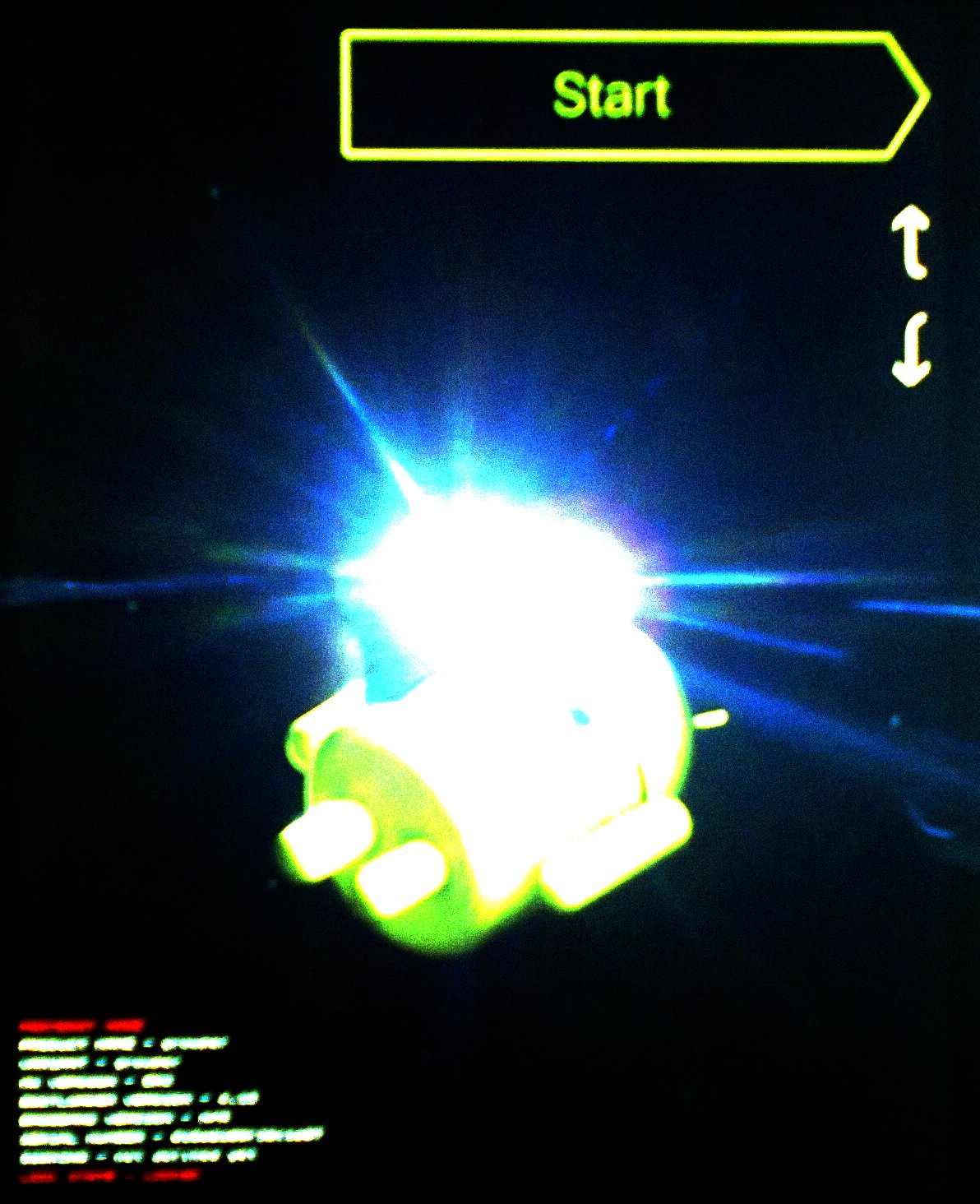
  2. Press and hold all three buttons. You will see the following:
  3. Use the volume buttons to navigate to Recover Mode
  4. Press the power button the confirm
    Now you will see the Android with a red triangle
  5. Now while holding the power button, press volume up
  6. Use the volume keys to navigate to wipe data/factory reset
  7. Press power button to select this option
  8. Go to Yes, erase all user data and press power button
And the "Type password to decrypt storage"-screen is gone... (and all data, too ;-)
[The official documentation can be found here.]

Jan 17, 2013

Windows 8: Configuring focus follows mouse and auto-raise behaviour

After switching to Windows 8 i was trying to configure the same mouse over behaviour as i am used to on my debian linux.
If you just want focus follows mouse and auto-raise=true, then follow the description given here.
If you want focus follows mouse and auto-raise=false, then you have to do some more work:
Read this technet article
Open the registry editor and go to HKCU\Control Panel\Desktop\UserPreferencesMask
Here you have to change the first bit to 1 and the seventh bit to 0

Example:
The number in UserPreferenceMask is 9E --> 10011110
Change the first bit to 1 --> 10011111
Seventh bit is already 0 --> 10011111
One thing left: Logoff or restart you pc and you are done...

Dec 5, 2012

Google indoor maps: How to use...

Yesterday i read at heise.de about Google indoor maps were released for Germany. So i tried to take a look at the indoor map of Frankfurt Aiport but i only got:

No indoor map. Was this headline wrong? I searched around and found http://www.google.de/mobile/maps/:

Newest Android version is installed on my tablet... Why does this not work? So i zoomed that the map scale showed 50m:

No indoor map at all... but there are some numbers... maybe levels? (and no public plans for level 0?)


Dec 1, 2012

Windows 8: Blue screen of death (BSoD) is back and its more helpful like ever before

After installing Cisco VPNClient on a Windows 8 pc, the system got unstable and every 30-60s a BSoD and a reboot occured.
After 5 times the BSoD changed to the following screens:

i chose troubleshoot:

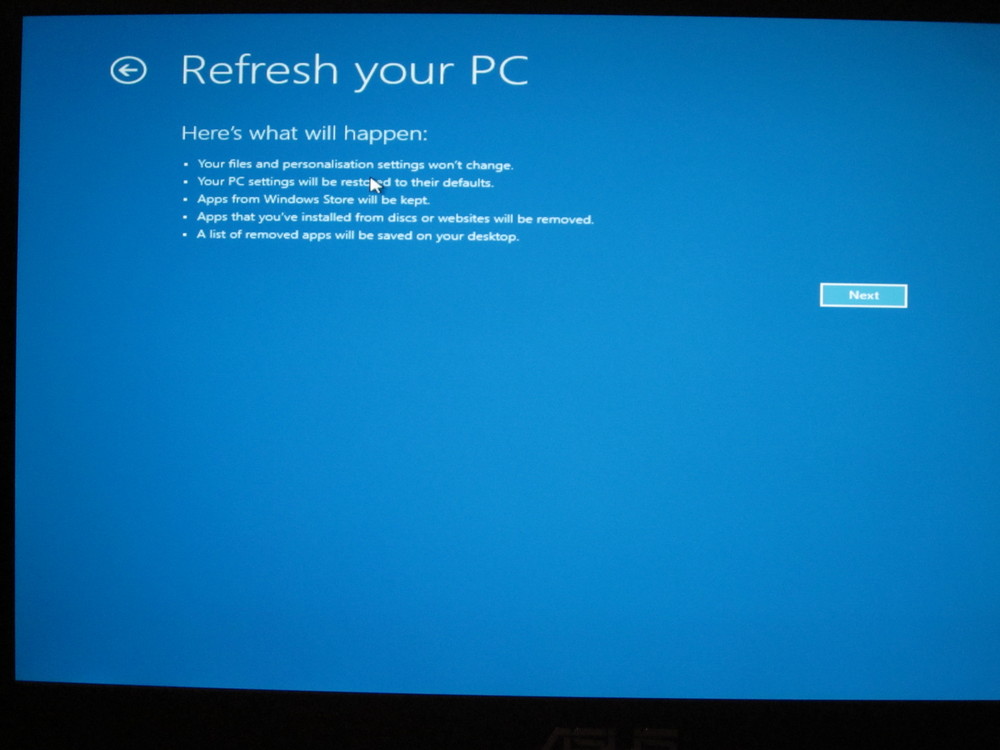
Reset did not really looked like what i wanted, so i chose "refresh your pc":

  • Your files and personalization settings won't change
  • Your pc settings will be restored to their defaults
  • Apps from Windows store will be kept
  • Apps that you've installed from discs or websites will be removed
  • A list of removed apps will be saved on your desktop
Doesn't look good, but i think this is better than starting from scratch:


And after several minutes Windows 8 was stable again, but i lost all applications installed from discs and websites. Only some portable programs were still there...