Nov 2, 2008

The lost (collaxa) BPEL-tutorials: 112.Arrays

If you do not know how to iterate over an array, you should read this tutorial:

To model an array with XML you have to create the following XSD:


The element line-item is modelled like this:

<element name="line-item" type="tns:line-itemType" maxOccurs="unbounded"/>

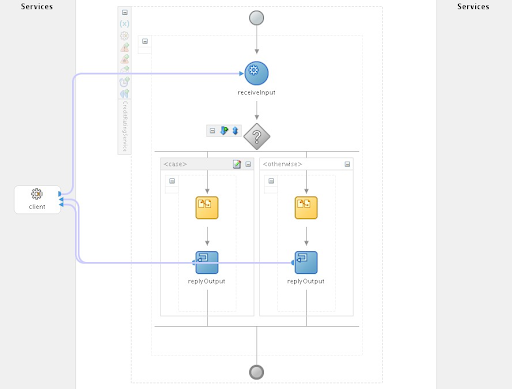
Here the BPEL of this collaxa-tutorial:

If you take a look at the sample code, it works like this:

  1. create a xpath-expression via concat
  2. use this xpath-expression inside another expression
  3. increment the iterator-variable
That's all:

concat('/tns:invoice/tns:line-item[',bpws:getVariableData('iterator'),']/tns:line-total')
is evaluated at runtime to:
/tns:invoice/tns:line-item[1]/tns:line-total
and inserted
bpws:getVariableData('input','payload','/tns:invoice/tns:line-item[1]/tns:line-total')

Another way is to write just
bpws:getVariableData('input','payload','/tns:invoice/tns:line-item[$iterator]/tns:line-total')
which is much easier...

One nice thing with this 112.Arrays example is, that after deployment you find the BPELConsole already filled with parameters:


How can this be achieved? After deployment you can use the checkbox "Save Test" for the first invoke and after that you get this parameters each time filled in.
In this example just take a look at the bpel.xml:


Inside the bpel.xml you can put the default data for the BPELConsole inside this CDATA:
<property name="defaultInput"><![CDATA[
<mydata>parameter1</mydata>
]]></property>


Oct 29, 2008

Truecrypt with ext3 on Linux

Yes, first i thougth this would be easy, too.
But after launching the truecrypt application


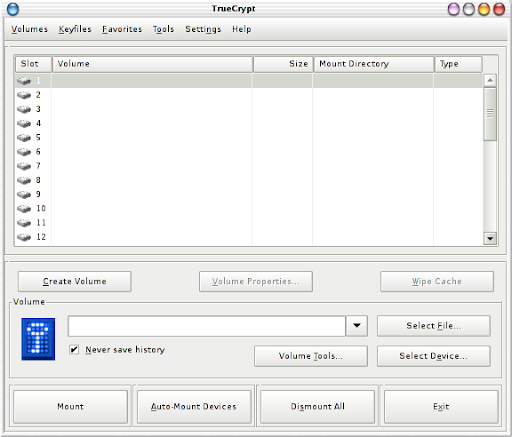
i got quickly to this page:


This pull-down menu has only the choices for FAT or NONE filesystem... So let's move to the command line:

hades:/home/schroff/packages# truecrypt -t --create
Volume type:
1) Normal
2) Hidden
Select [1]:

Enter volume path: /dev/sda3

Encryption algorithm:
1) AES
2) Serpent
3) Twofish
4) AES-Twofish
5) AES-Twofish-Serpent
6) Serpent-AES
7) Serpent-Twofish-AES
8) Twofish-Serpent
Select [1]:

Hash algorithm:
1) RIPEMD-160
2) SHA-512
3) Whirlpool
Select [1]:

Filesystem:
1) FAT
2) None
Select [1]: 2

Enter password:
Re-enter password:

Enter keyfile path [none]:

Plea
se type at least 320 randomly chosen characters and then press Enter:


Done: 0.370% Speed: 10.7 MB/s Left: 15 minutes

Done: 100.000% Speed: 4.1 MB/s Left: 0 s
The TrueCrypt volume has been successfully created.

hades:/home/schroff/packages# truecrypt -t /dev/sda3

But then i got this kernel error:

Oct 28 22:02:26 hades kernel: Modules linked in: loop af_packet fglrx(PF) iphone(F) binfmt_misc ipw2200 tun vboxdrv ppdev parport_pc lp parport ipv6 button
ac battery vfat fat dm_snapshot dm_mirror dm_mod sr_mod sd_mod snd_intel8x0m sbp2 scsi_mod eth1394 joydev mousedev tsdev snd_seq_dummy snd_seq_oss snd_seq_midi snd_rawmidi snd_seq_midi_event snd_seq snd_intel8x0 snd_ac97_codec rtc ac97_bus snd_pcm_oss snd_mixer_oss ohci1394 snd_seq_device snd_pcm snd_timer i2c_i801 psmouse snd soundcore snd_page_alloc firmware_class pcspkr ieee1394 ehci_hcd uhci_hcd usbcore intel_agp shpchp pci_hotplug agpgart evdev unix lzf
Oct 28 22:02:26 hades kernel: CPU: 0
Oct 28 22:02:26 hades kernel: EIP: 0060:[<f8fff99c>] Tainted: PF VLI
Oct 28 22:02:26 hades kernel: EFLAGS: 00010202 (2.6.21 #3)
Oct 28 22:02:26 hades kernel: EIP is at transfer_none+0x70/0xc4 [loop]
Oct 28 22:02:26 hades kernel: eax: d0fd9000 ebx: 3a748000 ecx: 00000080 edx: cc210000
Oct 28 22:02:26 hades kernel: esi: 3a748000 edi: d0fd9000 ebp: 00000200 esp: cc211e5c
Oct 28 22:02:26 hades kernel: ds: 007b es: 007b fs: 00d8 gs: 0000 ss: 0068
Oct 28 22:02:26 hades kernel: Process loop0 (pid: 11324, ti=cc210000 task=e5e3b030 task.ti=cc210000)
Oct 28 22:02:26 hades kernel: Stack: 00000000 1ee4eecd c7569c05 00000000 00000200 cc211f50 cc211fa0 f8ffe2e6
Oct 28 22:02:26 hades kernel: 00000000 c121fb20 00000000 00000200 01411f00 00000000 00000000 c1f4e900
Oct 28 22:02:26 hades kernel: 00000200 c0fa9000 f8fff92c 00000000 c121fb20 00000002 c1f4e900 823e0000
Oct 28 22:02:26 hades kernel: Call Trace:
Oct 28 22:02:26 hades kernel: [<f8ffe2e6>] lo_read_actor+0x9e/0xdc [loop]
Oct 28 22:02:26 hades kernel: [<f8fff92c>] transfer_none+0x0/0xc4 [loop]
Oct 28 22:02:26 hades kernel: [<c0146131>] do_generic_mapping_read+0x19f/0x46b
Oct 28 22:02:26 hades kernel: [<c014644b>] generic_file_sendfile+0x4e/0x60
Oct 28 22:02:26 hades kernel: [<f8ffe248>] lo_read_actor+0x0/0xdc [loop]
Oct 28 22:02:26 hades kernel: [<f8fff583>] loop_thread+0x38b/0x404 [loop]
Oct 28 22:02:26 hades kernel: [<f8ffe248>] lo_read_actor+0x0/0xdc [loop]
Oct 28 22:02:26 hades kernel: [<c0323712>] __sched_text_start+0x52a/0x5e2
Oct 28 22:02:26 hades kernel: [<c01463fd>] generic_file_sendfile+0x0/0x60
Oct 28 22:02:26 hades kernel: [<f8fff1f8>] loop_thread+0x0/0x404 [loop]
Oct 28 22:02:26 hades kernel: [<c0128c8b>] kthread+0xa0/0xc9
Oct 28 22:02:26 hades kernel: [<c0128beb>] kthread+0x0/0xc9
Oct 28 22:02:26 hades kernel: [<c010486f>] kernel_thread_helper+0x7/0x10
Oct 28 22:02:26 hades kernel: =======================

After some reading i found, that this i due to a bug in 2.6.21... So i had to download a new kernel, do my patches (like tuxonice), compile and get my fglrx driver for my ATI X600...
But after one evening, the next attempt:

hades:/home/schroff/packages# truecrypt -t /dev/sda3 --filesystem=none

hades:/home/schroff/packages# truecrypt -t --volume-properties
Slot: 1
Volume: /dev/sda3
Virtual Device: /dev/loop0
Mount Directory:
Size: 10.0 GB
Type: Normal
Read-Only: No
Hidden Volume Protected: No
Encryption Algorithm: AES
Key Size: 256 bits
Block Size: 128 bits
Mode of Operation: XTS
PKCS-5 PRF: HMAC-RIPEMD-160
PKCS-5 Iteration Count: 2000
Volume Created: Tue Oct 28 20:11:48 2008
Header Last Modified: Tue Oct 28 20:11:48 2008
Data Read since Mount: 4 KB
Data Written since Mount: 0 B


hades:/home/schroff/packages# mkfs.ext3 /dev/loop0

and after that i was able to mount the volume with

hades:/home/schroff/packages# truecrypt -t /dev/sda3


Oct 22, 2008

The lost (collaxa) BPEL-tutorials: 102.InvokingProcesses

After some non-BPEL related blog entries, the next BPEL tutorial. I started with the tutorials 101 (setting up your environment), 103 (XML fragments), 104 (sync BPEL), 105 (async BPEL). Now i think it is time to look how BPEL processes can be invoked.
Let's start with invoking via Perl:
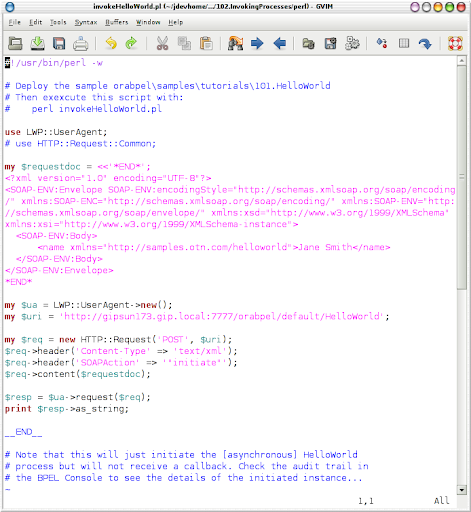
102.InvokingProcesses/perl/invokeHelloWorld.pl


To get this perl script running the helloWorld (101) has to be deployed. It very easy, just type


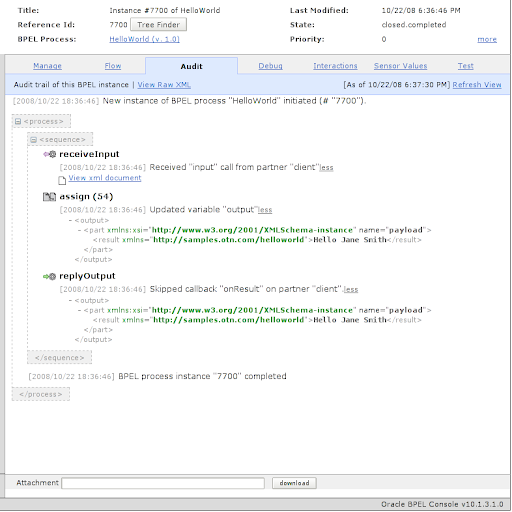
and just check, that the process was really invoked in the BPELConsole
(http://yourserver:7777/BPELConsole):


That's all. You only have to import

use LWP::UserAgent;
inside the Perl script and create a SOAP request.

This example was only the invocation of the asynchronous HelloWorld without waiting for the response. In the same directory you can find the
invokeCreditRatingService.pl. This scripts waits for the response of the BPEL process, but you have to deploy the CreditRatingService:


You can find it in $ORACLE_HOME/bpel/samples/utils/CreditRatingService (There is a CreditRatingService.jpr inside, so you can open it in your JDeveloper).
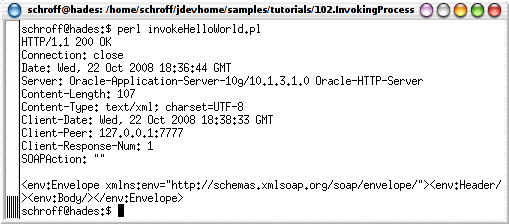
Invoking this BPEL via perl will show the following output:


And as you can see the perl script gets the result (560) of the BPEL...


Oct 7, 2008

Comparison: Pausing/Resuming VM with VMWare and VirtualBox

This comparison was done on a Samsung X20 laptop. (So on bigger machines the numbers will look different!).
Some words to the different concepts of VMWare and VirtualBox:

VMWare:
  • Pausing: Freezing all processes & hibernating the VM
  • Resuming: -
VirtualBox:
  • Pausing: Freezing all processes
  • Save machine state: Hibernating the VM
  • Restoring: Reverse function of Save machine state
  • Resuming: Reverse function of Pausing
These differences show, that with VirtualBox, you are able to only freeze all processes and resume them without any I/O for persistency of this state. This is done immediately.
The other transitions last about 9s on VMWare and 5s on VirtualBox (Linux VM with 256MB RAM and no workload).