Sep 28, 2022

Ubuntu raspberry pi: upgrade to 22.04...

Ubuntu released version 22.04 so i decided to make an update from

Ubuntu 21.04 (GNU/Linux 5.11.0-1027-raspi aarch64)

to

Ubuntu 22.04.1 LTS (GNU/Linux 5.15.0-1015-raspi aarch64)

But this was not so easy as i thought. Running on my raspberry pi the following services were running:

  • influxdb
  • collectd
  • telegraf
  • mosquitto
  • zigbee2mqtt
  • grafana

Without any problem only grafana was updated.

Collectd failed with this message:

Package 'collectd' has no installation candidate

no chance to fix that :(

With that i had to disable the collectd section in influxdb - with that session it failed with 

influxd-systemd-start.sh[2293]: run: open server: open service: Stat(): stat /usr/share/collectd/types.db: no such file or directory

Then zigbee2mqtt was not able to write to mosquitto. This is due a change of the default settings of mosquitto. allow_anonymous false is now default, so i had to add

allow_anonymous true

After that zigbee2mqtt was able to write data to mqtt again.

Last thing: restart of telegraf, because just did not start properly after the first reboot after the upgrade.

Not really a good update - my other raspberry pi will stay on 21.04 for some more months...

Jul 10, 2022

Elster.de: To many request for german government portal...

In Germany, the property tax had to be reformed due to a ruling by the Federal Constitutional Court. So this year everybody got a mail with the request to register his property from july 1st up to the end of the year.

This should be done via ELSTER = electronic tax declaration (explanation of the acronym can be found here)  

I tried this yesterday and today, but the login page does not respond at all.

Today a message was posted on their website (orange box on the screenshot)

Restrictions when using the ElsterSmart app
It is currently not possible to use Mein ELSTER using the ElsterSmart app if the ElsterSmart app and Mein ELSTER are used on different devices (e.g. if you have installed ElsterSmart on your smartphone or tablet, but Mein ELSTER in the browser on your
use PC).

and

Availability Limitations
Due to the enormous interest in the forms for the property tax reform, there are currently restrictions on availability. We are already working intensively on being able to provide you with the usual quality as quickly as possible.

I think just at least 10 million citizens try to follow the request and the on datacenter the servers are on their limit:

Even the status page shows a 404: https://www.elster.de/elsterweb/svs

So let's see if it is possible to follow the request until end of the year or if this deadline gets extended for some years :).


May 26, 2022

Review: Securing containers & cloud for dummies

Securing containers & cloud (provided by sysdig) is a booklet with 42 pages and 7 chapters. Like most of the "for dummies" series the last chapter is a summary with ten considerations.

But let's start from the beginning:
Chapter one "understanding cloud security" is a really nice abstract. Here some of the topic, which you should be aware of: "overprivileged identites", "visibility over cloud assets", "leaving out IT", "former employees, one-time users and guest accounts that are left active", ... With knowing that the following proposal is made: "to dectect and stop cyber threats [..] first step is to see them". Therefore a singe event store should be used and a open-source validation because of validation an transparency.
The second chapter is named "securing infrastructure as code (IaC). The typical arguments for IaC are speed, scalabilty, resilience, reproducibility but what about security? IaC is created by the developers and this code has to be checked as well as the application sources. And even if IaC is checked, configuration templates in  a CI/CD pipeline will suffer from drift. "Policy as code PaC allows you to leverage a shared policy model across multiple IaC, cloud, and Kubernetes environments.  Not only does PaC provide consistency and strengthen security, but also it saves time and allows you to scale faster."
"Preventing Vulnerabilites" is the third chapter. Many images in production contain patchable vulnerabilites, which should be patched. So the selecting of container images from every source (including DockerHub) without scanning them is not a good idea. One subsection here is "Automate vulnerability scanning in the CI/CD pipeline". I think this is something you should read in the booklet in detail.
After scanning for threats, the next chapter is about detecting and responding to threats. This chapter is only about 3 pages and it is more an appetizer for Falco, which is a solution from sysdig.
The sixth chapter is named "Targeting monitoring and troubleshooting issues" is is plea for open source. "Avoiding Vendor Lock-In" is key to success at least from the perspective of the authors.
As in the beginning mentioned the last chapter is a ten point summary of the topic. This is a fast checklist, you can use.
 

All in all a very good high level introduction into "Securing Containers & Cloud". I recommend all DevOps engineers and developers to spend half an hour to read this booklet.

Dec 27, 2021

Running a movie on an external DVD drive on a Chromebook (like HP x360)

In a first step this task sounds very easy:

  • watch a DVD on a chromebook

But...

What are the problems?

  1. Using an external drive to access the dvd
  2. No appropriate app available in play store or chrome web store

There are different solutions out there. 

  1. Convert the DVD to a mp4 and watch this
  2. Use VLC from play store --> does not recognize the DVD
  3. Use VLC from chrome web store --> does not start at all
  4. Use linux development environment

Option 4 seemed to me as the most promising way to go.

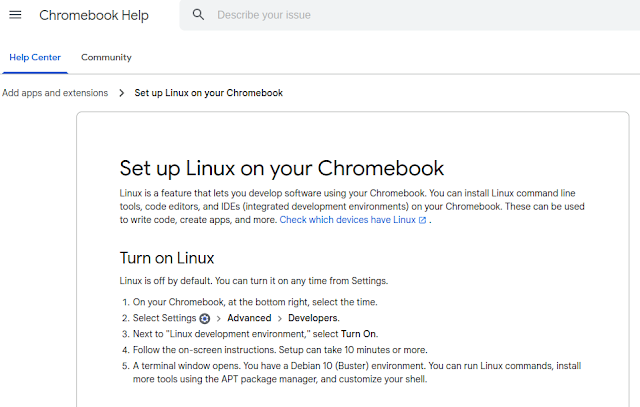
Setting up linux is very easy:

 After that you have a debian bullseye running inside a container. Go to /etc/apt/sources.list and add "contrib" after "deb https://debian.org/debian bullseye main " ("sudo bash" to get root). Then 

apt update
apt upgrade
apt install vlc libdvd-pkg
dpkg-reconfigure libdvd-pkg

After that vlc is configured including the libdvdcss for the DVD region codes.

One last problem is to access the DVD inside this linux container. This can be done via a double tap inside the file-manager on the chromebook and then you can choose inside the context menu "share with linux (Mit Linux teilen)".

This last step has to be done each time a DVD is inserted. 

So watching DVDs on a chromebook is not impossible, but it is not really user friendly...