Jul 22, 2010

Review at amazon: Turbo Coded Modulation for Multicarrier Communication Systems: Applications to WiMAX, WLAN and DSL

Bump!
Did you ever think about how you cd player does its error correction? If so, you know abount Reed-Solomon-Codes. But this is state of the art of 1960 (ok: 1980). Just take a look at wikipedia:

Today, RS codes are widely implemented in digital storage devices and digital communication standards, though they are being slowly replaced by more modern low-density parity-check (LDPC) codes or turbo codes.
And if you want to dive into this new world, here is a chance to start:


A printout of a dissertation which can compete with signal processing lectures. Not easy to read but the subject is not easy, too ;-). Read my review at amazon (like always only in german, sorry).

Jun 27, 2010

Review at amazon: VirtualBox 3.1 - Beginner's Guide

Many postings on this blog are related to virtualization technology. Some about VMWare and most about VirtualBox. This weekend i read this book:

Here a summary from packtpub.com about this book:
  • Download and install VirtualBox in a Windows/Linux environment
  • Create your virtual machine on VirtualBox, using Ubuntu Linux Desktop/Windows XP as the "guest" operating system
  • Share folders and pass information between the host and the guest operating systems
  • Explore the Hardware 3D Acceleration feature available in Windows and Linux guests
  • Revert the state of a virtual machine using snapshots
  • Architect a virtual machine using fixed and dynamically expanding hard drive images and choose the appropriate hard disk controller
  • Clone hard disks using the Virtual Media Manager
  • Connect a virtual machine to the Internet and a local network using the default NAT mode
  • Illustrations for using WordPress, Drupal, and File Server virtual appliances
  • Set up a headless server and create, manage, and run virtual machines in that server from a remote PC
But in this list there are some important points missing like
  • Using Seamless Windows (using windows from the virtual machine within the host desktop)
  • Shared folders between guest and host
  • Configuring the disk controller type for a guest (IDE <-> SATA <-> SCSI)
  • Snapshottings guest machines
My summary: VirtualBox 3.1 is a good book with many configurations including detailed screenshots. For Beginners it is very easy to get everything running. Experts should skip the chapter 1 to 3, because there you can only find howto install a guest (like ubuntu, windows 7, damn small linux) or how to browse inside a guest or using openoffice. But the rest even experts should read!
If you are interested, take a look at my review at amazon.de (It is written in german, sorry).

Jun 2, 2010

Oracle Fusion Demo


Download the zip-file from here.
Then create a appropriate directory:
mkdir fusiondemo
cd fusiondemo
unzip /tmp/FusionOrderDemo_R1PS2.zip
After that you will see:
schroff@hades:$ l
insgesamt 32
drwxr-xr-x  7 schroff schroff 4096  2. Jun 21:38 .
drwxr-xr-x 11 schroff schroff 4096  2. Jun 21:38 ..
drwxr-xr-x 13 schroff schroff 4096  2. Jun 21:38 CompositeServices
drwxr-xr-x  6 schroff schroff 4096  2. Jun 21:38 Infrastructure
drwxr-xr-x  6 schroff schroff 4096  2. Jun 21:38 MasterPriceList
-rw-r--r--  1 schroff schroff 3061 28. Mai 11:00 readme.txt
drwxr-xr-x  7 schroff schroff 4096  2. Jun 21:38 StandaloneExamples
drwxr-xr-x  7 schroff schroff 4096  2. Jun 21:38 StoreFrontModule
The readme.txt contains the following:

About the Oracle Fusion Order Demo Application

Fusion Order Demo (FOD) is an end-to-end application sample developed by Fusion Middleware Product Management. The purpose of the demo is to demostrate common use cases in Fusion Middleware applications, including the integration between different components of the Fusion technology stack, (ADF, BPEL, and WebCenter). The demo contains several applications that make up various parts of functionality.

Note that there are two versions of the demo: One which includes the ADF and SOA components (named FusionOrderDemo_R1PS2.zip), and one which includes these components, as well as WebCenter functionality. 
About the Applications included in the Demo (organized by extracted directory name)

CompositeServices - WebLogicFusionOrderDemo.jws is a sample SOA application based on Oracle Mediator, BPEL Process, Human Task, Business Rules, and Messaging Service. This application shows how to use Oracle SOA Suite to integrate a number of applications into one cohesive ordering system. The accompanying developer's guide for this module is Oracle<AE> Fusion Middleware Developer's Guide for Oracle SOA Suite 11g (http://www.oracle.com/pls/as111130/lookup?id=SOASE).

Infrastructure - Infrastructure.jws contains the database schema information for the sample application. All applications use the same schema, FOD. The accompanying Developer's Guide for this module is Oracle<AE> Fusion Middleware Fusion Developer's Guide for Oracle Application Development Framework 11g (http://www.oracle.com/pls/as111130/lookup?id=ADFFD).

MasterPriceList - MasterPriceList.jws is a sample application that integrates with Microsoft Excel to demonstrate the use of ADF Data Integration functionality. The accompanying Developer's Guide for this module is Oracle<AE> Fusion Middleware Desktop Integration Developer's Guide for Oracle Application Development Framework 11g  (http://www.oracle.com/pls/as111130/lookup?id=ADFDI).

StandaloneExamples - This module contains several workspaces that demonstrate various features of the ADF Framework that are not included in the Store Front scenario. The accompanying Developer's Guide for this module is Oracle<AE> Fusion Middleware Fusion Developer's Guide for Oracle Application Development Framework 11g  (http://www.oracle.com/pls/as111130/lookup?id=ADFFD).

StoreFrontModule - StoreFrontModule.jws is a sample web application based on Oracle ADF Business Components, ADF Model data bindings and ADF Faces. The application follows an online shopping scenario and contains hook points for integrating with the CompositeServices module. The accompanying Developer's Guide for this module is Oracle<AE> Fusion Middleware Fusion Developer's Guide for Oracle Application Development Framework 11g (http://www.oracle.com/pls/as111130/lookup?id=ADFFD).

The sample application is provided for informational purposes only.

Credits
Fusion Order Demo was created by:

Laura Akel
Duncan Mills
Lynn Munsinger
Juan Ruiz
Clemens Utschig
Kundan Vyas

Each directory contains another readme.txt for further instructions
(deployment, import to jdev).
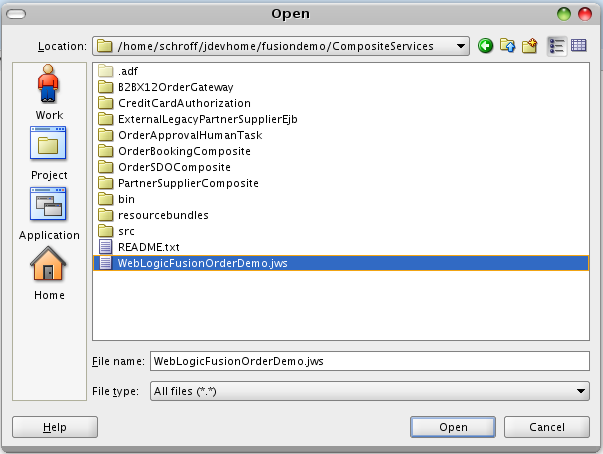
Inside the CompositeServices you should open the jws-file with jdeveloper:

The follwing screenshot shows the applications with SOA content:

Here the composite.xml form the B2BX12OrderGateway:


This is a really small composite. If you want to see something larger, you should open the composite from the OrderBooking application. In one of the next posts i will try merge the screenshots to one picture (or does anybody know, how to create images from composites without doing screenshots?)...



May 15, 2010

Building Virtualbox from scratch

Virtualbox can be used with two licenses. Here the official statement from the website:
The full VirtualBox package is available in binary (executable) form free of charge from the Downloads page. This version is free for personal use and evaluation under the terms of the VirtualBox Personal Use and Evaluation License.
If, instead, you wish to purchase licenses for enterprise use and/or enterprise support for VirtualBox, please do not hesitate to contact your Sun representative or buy online from the Web Store
The VirtualBox Open Source Edition (OSE) is the one that has been released under the GPL and comes with complete source code. It is functionally equivalent to the full VirtualBox package, except for a few features that primarily target enterprise customers. This gives us a chance to generate revenue to fund further development of VirtualBox.

So if you want to use Virtualbox under GPL you have to build it from scratch. This is not very difficult:

  1. Download the OSE (Open Source Edition) from Virtualbox
  2. Take a look at the build instructions
  3. If you are running Debian, you have to install the following packages:
    apt-get install bin86 bcc iasl libxml2-dev libxslt-dev liborbit-de libcurl4-openssl-dev libpng12-dev libsdl1.2-dev libxcursor-dev libxmu-dev python-dev libpulse-dev libcap-dev libqt4-opengl-dev
  4. Unpack the tarball
    tar -jxf VirtualBox-3.1.8-OSE.tar.bz2
  5. Configure the package
    ./configure -help
    Usage: ./configure [OPTIONS]...

    Configuration:
    -h, --help display this help and exit
    --nofatal don't abort on errors
    --disable-xpcom disable XPCOM and related stuff
    --disable-python disable python bindings
    --disable-sdl-ttf disable SDL_ttf detection
    --disable-alsa disable the ALSA sound backend
    --disable-pulse disable the PulseAudio backend
    --disable-dbus don't use DBus and hal for hardware detection
    --disable-kmods don't build Linux kernel modules (host and guest)
    --disable-opengl disable OpenGL support
    --enable-webservice enable the webservice stuff
    --disable-hardening don't be strict about /dev/vboxdrv access
    --build-libxml2 build libxml2 from sources
    --build-libxslt build libxslt from sources
    --setup-wine setup a Wine directory and register the hhc hack

    Paths:
    --with-gcc=PATH location of the gcc compiler [gcc]
    --with-g++=PATH location of the g++ compiler [g++]
    --with-kbuild=DIR kbuild directory [/tmp/VirtualBox-3.1.8_OSE/kBuild]
    --with-iasl=PATH location of the iasl compiler [iasl]
    --with-mkisofs=PATH location of mkisofs [mkisofs]
    --with-linux=DIR Linux kernel source directory [/lib/modules/2.6.28.7/build]
    --with-qt-dir=DIR directory for Qt4 headers/libraries [pkgconfig]
    --with-openssl-dir=DIR directory for OpenSSL headers/libraries
    --out-path=PATH the folder to which configuration and build output
    should go

    Build type:
    -d, --build-debug build with debugging symbols and assertions
    --build-profile build with profiling support
    --build-headless build headless (without any GUI frontend)
  6. schroff@hades:$ ./configure
    Checking for environment: Determined build machine: linux.x86, target machine: linux.x86, OK.
    Checking for kBuild: found, OK.
    Checking for gcc: found version 4.3.2, OK.
    Checking for as86: found version 0.16.17, OK.
    Checking for bcc: found version 0.16.17, OK.
    Checking for iasl: found version 20061109, OK.
    Checking for xslt: found, OK.
    Checking for pthread: found, OK.
    Checking for libxml2: found version 2.6.32, OK.
    Checking for libxslt: found version 1.1.24, OK.
    Checking for libIDL: found version 0.6.8, OK.
    Checking for ssl: found version OpenSSL 0.9.8g 19 Oct 2007, OK.
    Checking for libcurl: found version 7.18.2, OK.
    Checking for zlib: found version 1.2.3.3, OK.
    Checking for libpng: found version 1.2.27, OK.
    Checking for SDL: found version 1.2.12, OK.
    Checking for X libraries: found, OK.
    Checking for Xcursor: found, OK.
    Checking for Xmu: found, OK.
    Checking for Mesa / GLU: found version 1.2, OK.
    Checking for Qt4: found version 4.4.3, OK.
    Checking for Qt4 devtools: found version 4.4.3, OK.
    Checking for python support: found version 2.5.2, OK.
    Checking for static stc++ library: found, OK.
    Checking for Linux kernel sources: found version 2.6.28, OK.
    Checking for ALSA: found version 1.0.16, OK.
    Checking for PulseAudio: found version 0.9.10 API version 11, OK.
    Checking for libcap library: found, OK.
    Checking for compiler.h: compiler.h not found, OK.

    Successfully generated '/tmp/VirtualBox-3.1.8_OSE/AutoConfig.kmk' and '/tmp/VirtualBox-3.1.8_OSE/env.sh'.
    Source '/tmp/VirtualBox-3.1.8_OSE/env.sh' once before you start to build VBox:

    source /tmp/VirtualBox-3.1.8_OSE/env.sh
    kmk

    To compile the kernel modules, do:

    cd ./out/linux.x86/release/bin/src
    make


    +++ WARNING +++ WARNING +++ WARNING +++ WARNING +++ WARNING +++ WARNING +++
    Hardening is enabled which means that the VBox binaries will not run from
    the binary directory. The binaries have to be installed suid root and some
    more prerequisites have to be fulfilled which is normally done by installing
    the final package. For development, the hardening feature can be disabled
    by specifying the --disable-hardening parameter. Please never disable that
    feature for the final distribution!
    +++ WARNING +++ WARNING +++ WARNING +++ WARNING +++ WARNING +++ WARNING +++

    Enjoy!
  7. source ./env.sh 
  8. kmk all
  9. cd out/linux.x86/release/bin/components
    ln -s ../VBoxDDU.so .
    ln -s ../VBoxREM.so .
    ln -s ../VBoxRT.so .
    ln -s ../VBoxVMM.so .
    ln -s ../VBoxXPCOM.so .
  10. Last but not least follow the instructions here to build the kernel modules und to run Virtualbox...
If this was to much work, just do the three steps here and use official binaries...