Aug 20, 2008

Review at amazon: Distributed Services with OpenAFS: For Enterprise and Education

After my blog about OPENAFS i searched amazon for books covering this topic. I found this book:

After reading it, i wrote a review, which is now online. It is in german, so here a short summary:
  • excellent introduction in OpenAFS including Kerberos & LDAP
  • many command line examples to create a AFS cell or duplicating volumes or backup data
  • an explanation for AFS to Samba bridge
  • information about NTP (because Kerberos and AFS are time sensitive)
  • basics about Postgresql, Mail, Mosix, ....
On amazon.com there is a review in english.
So i say: If you want to start with AFS or if you are working with AFS, read it!

Aug 3, 2008

The lost (collaxa) BPEL-tutorials: 105.AsyncCompositeLoanBroker

Here the next BPEL tutorial. If you are starting now, please set up your environment first (take a look on the previous tutorials).
The AsyncCompositeLoanBroker will show you, how to call an asynchronous webservice/BPEL within a BPEL.

  1. Open the LoanBroker.jpr in your JDeveloper. Then open the BPEL:

  2. The LoanService is used with an Invoke and a Receive. This has to be done everytime the wsdl you use has the structure (asynchronous):
    <portType name="LoanService">
    <operation name="initiate">
    <input message="tns:LoanServiceRequestMessage"/>
    </operation>
    </portType>
    <portType name="LoanServiceCallback">
    <operation name="onResult">
    <input message="tns:LoanServiceResultMessage"/>
    </operation>
    </portType>

    and not like this (synchronous)
    <portType name="StockQuoteService">
    <operation name="process">
    <input message="tns:StockQuoteServiceRequest"/>
    <output message="tns:StockQuoteServiceResponse"/>
    </operation>
    </portType>

    For more information read the WSDL-specification...
  3. To get the tutorial running, you have to modify all build.properties in ../../utils/AsyncLoanService and in the LoanBroker project (http.port, admin.password, ...) .
  4. Do a right click on the build.xml and choose "Run Ant Target" -> deploy
    This target will deploy the LoanService and the LoanBroker.
  5. To start the BPEL open the BPELConsole -> Dashboard and click on LoanBroker. Put some parameters in the form and click invoke.

  6. In opposite to an invoke of synchronous BPEL, you will not get the response. The BPELConsole shows the following:

  7. Click on the audit and there you can see the result of the instance.
    This audit screen is very nice for debugging or retracing workflow instances.
The advantage of asynchronous BPELs is, that you do not have to care about timeouts, but this comes with the cost, that the BPEL PM has to dehydrate the instance into the database (which is a little bit slower...)

Jul 18, 2008

Openafs on Debian (Configuration)

A few days ago a friend asked me, how to install openafs on a Debian Linux. I told him, that he just has to follow my article on www.debianplanet.org...
But on www.debianplanet.org he only got the following information:
Temporarily removed due to spammers, read-only archive version will be back after reconfiguration.

OpenAFS Logo
So i searched in my files and finally i found my article:
Submitted by dschroff on Friday, November 01, 2002 - 23:59

Here the content:

This is a quick and dirty rundown of how to install OpenAFS and Kerberos 5 and get it all working. OpenAFS is a pretty advanced and rockin' distributed filesyste; for more information, check out openafs.org.
As an absolute minimum, you'll need to install the following packages:

libpam-openafs-session
openafs-client
openafs-krb5
openafs-modules-source
libkrb53
krb5-clients
krb5-config
krb5-doc
krb5-user
libpam-krb5
openafs-krb5


If you're running a server, you'll also need to install the following packages.


openafs-dbserver
openafs-fileserver
krb5-admin-server
krb5-kdc

Secondly, you'll need to set Kerberos up. Read and follow the instructions in /usr/share/doc/krb5-doc/install-guide.ps.gz and create a user called admin.
After this, you'll need to build the OpenAFS module. Extract the /usr/src/openafs.tar.gz file and
read /usr/src/modules/openafs/debian/README.modules; this will create the package and tell you how to install it.
After you're built OpenAFS, you'll need to configure this. First, edit /etc/openafs/ThisCell to set your domain name, then edit /etc/openafs/CellServDB, and add your server and domain. Copy these files to /etc/openafs/server and create a partition /vicepa for the data with a filesystem of your choice.
On the server, type:

#>kadmin.local -q "ank -randkey afs"
#>kadmin.local -q "ktadd -e des-cbc-crc:afs3 -k /etc/krb5.keytab.afs afs"
#>asetkey add foo /etc/krb5.keytab.afs afs
#>bosserver -noauth &
#>bos listhosts servername -noauth
#>bos create -server servername -instance ptserver -type simple -cmd /usr/lib/openafs/ptserver -cell domainname -noauth
#>bos adduser servername admin -cell domainname -noauth
#>bos listkeys servername -cell domainname -noauth
#>pts createuser -name admin -cell domainname -noauth
#>pts adduser admin system:administrators -cell domainname -noauth
#>pts membership admin -cell domainname -noauth
#>bos restart servername -all -cell domainname -noauth
#>bos create -server servername -instance fs -type fs -cmd /usr/lib/openafs/fileserver -cmd /usr/lib/openafs/volserver -cmd /usr/lib/openafs/salvager -cmd /usr/lib/openafs/vlserver -cell domainname -noauth
#>bos status servername fs -long -noauth
#>vos create -server servername -partition /vicepa -name root.afs -cell domainname -noauth
#>bos shutdown servername -wait
#>pkill bosserver
#>/etc/init.d/openafs-fileserver start
#>/etc/init.d/openafs-client start
#>kinit admin && klist
#>aklog && tokens
#>fs checkvolumes
#>fs setacl /afs system:anyuser rl
#>vos create servername /vicepa root.cell
#>fs mkmount /afs/domainname root.cell
#>fs setacl /afs/domainname system:anyuser rl
#>fs mkmount /afs/.domainname root.cell -rw
#>pts creategroup groupname -id -groupname
#>mkdir /afs/domainname/home

foo is the number of the key.
When you've done all this, it's time to add a user; you need a working NSS system for this. To add users, type:

#>adduser --disabled-password

To tell Kerberos and OpenAFS about your new user, type:

#>kadmin.local -q "ank -maxlife 30days username"
#>vos create servername /vicepa username
#>fs mkmount /afs/domainname/home/username username
#>vos release root.cell
#>fs checkvolumes
#>pts createuser username -id userid
#>pts adduser username groupname
#>fs sa /afs/domainname/home/username username all
#>fs setquota /afs/domainname/home/username -max 500000

Now you'll need to set up the /etc/pam.d files. Just play with the configuration files or send me an e-mail; even better, check out the debian-security archives.
Good luck!


Yes, i know there are better installation tutorials like this one, which is really excellent, but look at the references: [1] Installing OpenAFS, http://www.debianplanet.org/node.php?id=816 !!!!
I hope debianplanet will be back soon...

Jul 10, 2008

The lost (collaxa) BPEL-tutorials: 104.SyncQuoteConsumer

The SyncQuoteConsumer tutorial shows how to call another BPEL workflow. As the title indicates, this is done in a synchronous way. (If you want to know how to call a BPEL workflow in an asynchronous way, wait for 105...)

To get the tutorial running you have to change in samples/utils/StockQuoteService in the StockQuoteService.bpel in bpelx:exec name="validate" the Element to oracle.xml.parser.v2.XMLElement:

String symbol = ((oracle.xml.parser.v2.XMLElement)
getVariableData("input", "symbol","/symbol"))
.getFirstChild().getNodeValue();

Here a screenshot of the original code and the changes made visible with the history feature of Jdeveloper:
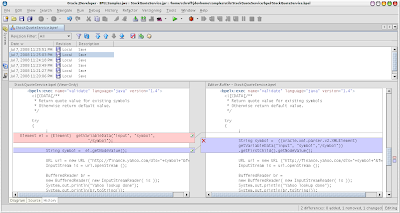
(With the third tab on the bottom of the window, you can see, what changes you have done to your sources.)

In the StockQuoteService you have to change the build.properties to your port and password:
#admin.user = oc4jadmin
admin.password = mysecret
# http.hostname and http.port should point to BPEL Server's host and http port
#http.hostname = localhost
http.port = 7777
To deploy the StockQuoteService and the SyncQuoteConsumer you only have to run ant on the SyncQuoteConsumer build.xml because in this file the following is defined:

<target name="deploy" depends="pre-build, process-deploy, post-build" />
and the pre-build.xml just says:
<?xml version="1.0"?/>
<project name="bpel.pre-build" default="pre-build" basedir="."/>
<target name="StockQuoteService"/>
<ant dir="../../utils/StockQuoteService"//>
</target/>
<target name="pre-build" depends="StockQuoteService"//>
</project/>
and so both BPEL projects are deployed with one ant run.

To add a PartnerLink to a BPEL project follow this documentation.
The service explorer window should show the following (this works only after the deployment of the StockQuoteService!):
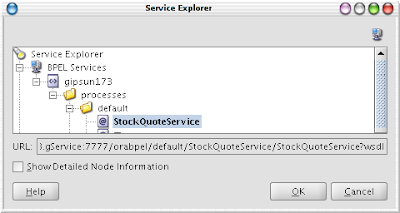
For more information about PartnerLinks look at this link.
Your PartnerLink has to look like:
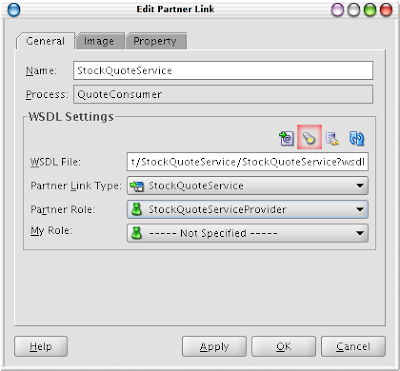
If you want to change the PartnerLink to another BPEL click on the torch (red square) and you will get back to the service explorer.

To see that everything was done right, you can run the SyncQuoteConsumer with this message:

<symbol xmlns="http://samples.otn.com">ORCL</symbol>
and you will get the stock quote for Oracle....

One good thing of synchronous invocations: You need no correlation sets and it is very easy, but if the called instance needs more than 45s, you will get an ORABPEL-05002 error. You can learn avoiding it on my posting two months ago.